2. Another Interface Possibility

This morning I had a pretty good idea. Really the best ideas are the ones that solve like 3 problems at once and in hindsight just seem stupidly obvious.

The Problem

I touched on this in the previous post, but I will reiterate below for clarity:

So, I currently have two major categories of puzzle panel in the game. The first, which I call “freeform” or “togglers” is a simple grid which you can move around on and toggle tiles at your leisure. The second type of puzzle in the game which I call “snake” puzzles, after the game of the same name.
dAtcCfH

I just call them that because they have a certain movement type where you must highlight connected squares in order and cannot cross over tiles you have already lit up. You’re sort of drawing a line. Otherwise, they aren’t that similar to Snake, in that you don’t have a fixed length and you aren’t collecting anything along the way.

As I mentioned in last week’s post, I’ve been thinking about changing the overall input method in order to avoid the weird mode switching and the sort of unnatural feel of the cursor. The solution was proposed by Casey Muratori, and is pretty simple: Just always have the player be walking around, even when they are solving panels.

Now, this is really no problem for the toggler panels, as you just move the player around and press a button when you want to switch the tile you are standing on. But for the snake panels, it’s a bit more of a difficult problem. How do I enforce the rules such that the player cannot cross over the line they have already drawn.

My first idea was that perhaps each tile would raise up into a wall behind the player as they stepped off of it. This is good in that it enforces the impassibility of the line by utilizing the collision detection of the player. However, it has the nasty issue of not really lining up with the original mechanic. The problem there is about what happens when the player gets to the last tile of the shape they were wanting to fill in. Since the shape is not really raised/lit up until the player steps off of tile normally, there are really only two options: either the player must step off of the panel entirely, or the tiles have to light up when you step on them but only raise up when you step off of them.

Neither of these solutions really made me feel very happy, because it didn’t have a good unification between raised tiles and highlighted ones. In short: it seemed pretty forced.

As I also mentioned in the last post, I was also having issues with how you would even define where you would start on that type of panel. If we are saying the player can go around and hit a button on the panel, they can really go and do that anywhere. But for gameplay purposes, sometimes I want to constrain where the player can draw the line from.

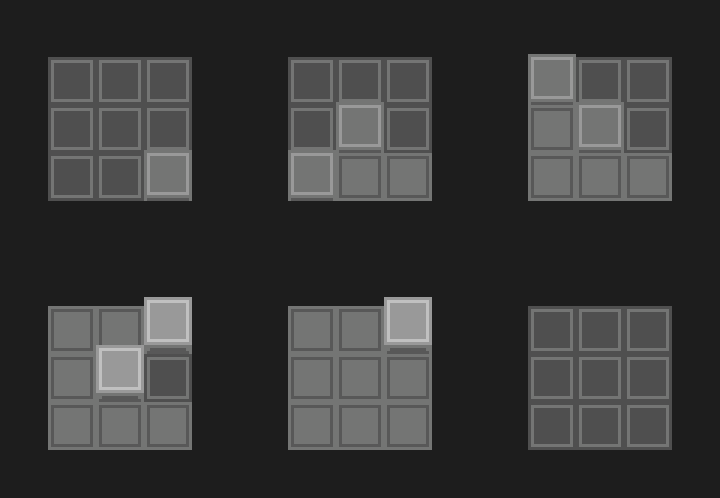
So, the idea I came up with this morning is represented in the following gif (just a mockup, but the final thing should be somewhat similar):
snake_puzzle_protoanimbig

So, what is it?

Essentially it is the same as the “can’t start here” tiles of the last post, only represented in a way that is similar to the “raised walls” idea from before. So the player starts on the raised area, which acts as a button, depressing and lighting up. At that point, the next available tiles raise up and can then be pressed. If there are multiple tiles to choose from, all of them depress when one button is pressed, but only the one the player was standing on remains lit.

I usually gravitate towards the ideas that feel like the most elegant representation of an idea. And since I first realized I had this problem, I was really struggling to find anything elegant. It just felt like I was trying to shoehorn the old puzzles into a new mechanic. But this I feel like is a really beautiful solution that enforces the rules of the original mechanic and translates it into a new input method while feeling actually better than the original mechanic did.

I still have one problem to solve with the input method change, which is actually an old problem. And that is visually distinguishing between the two main panel types. I can either have the player always press a button when their avatar is standing over the tile they want to depress, and the toggler panel also will just have a bunch of the button tiles that are raised up and behave a bit differently.

Not totally happy with that, but I’m reaching a point in my game design career that I’ve started to just be at peace and know that a good and elegant idea will come along eventually. The game doesn’t have to ship tomorrow.

Until it does, then maybe we just go with what seems the least bad, or try to cut what we can.
 

1. Interface changes

So, I decided to start a weekly devlog for this puzzle game I’m working on (presently called Taiji or Tai-ji). I’ve already been working on the game for a few months and it has a couple hours of gameplay.

I’m not sure how much I should go into explaining the mechanics of the game, but I’ll go ahead and give a basic overview: It’s a top-down 2D game where you explore a mysterious world and solve the puzzles you find there. The game has a core puzzle mechanic, which is these grids of tiles that can be toggled on or off.

image
Here’s a basic example.

Keep in mind the art and everything is very much work in progress. But generally the way the game works at the moment is you walk up to one of these start tiles and then press a button to go into a mode where you are interacting with the panels using a cursor. The cursor is similar to Tetris Attack or any other block based puzzle game.

Okay enough explaining of the basics.

This past week I put together a build and sent it out to some friends (William Chyr, Casey Muratori, Martin Cohen, Brian Moriarty), and got some feedback. Casey was pretty appalled by the control scheme and user interface I have going on at the moment. I did try out a new control scheme this week that mapped entering and exiting the panels to the same key, which was probably a bad idea. Worse still I never really swapped the buttons around on the controller, so there was sort of a backwards feeling where you press B to toggle tiles and A to exit the panel.

Besides my misguided control changes, there were also just a bunch of interface issues which Casey readily pointed out. Some of those can be fixed with feedback, but others perhaps not.

A very interesting solution posed by Casey to the interface nastiness would be to change the interaction method to always consist of the “player as cursor” model. “You always want to move a dude around,” says Casey, and I can’t argue that the abstracted cursor interface of the panels is somewhat unsatisfying to interact with to say the least.

So the plan is to implement that input style pretty soon, but in the meantime I have added some better visual polish and cues go the current interaction model so that I can give the new one a more fair comparison. After all, there really had not been much consideration for how the panels felt to interact with beyond the bare minimum.

So I added some interpolation on cursor movement as well as a bit of a bump when you try to move the cursor onto a tile which you cannot because it was already filled or what have you. I also made it to where the panel flashes repeatedly when it is in a solved state but you are still in interact mode. I think this probably helps somewhat with an issue that the panels had before where you would sometimes solve the panel and then expect the stick to move your avatar instead of the cursor. Differentiating between different states is probably more important than I had expected and I should have done a some of this baseline polish work sooner. As Casey said, it’s the primary thing that you are doing in the game, so it had better feel pretty damn good.

Anyway, besides that I have just been thinking about some of the issues that the player as cursor model will create which must be solved. For the toggle type panels , there really are not that many issues. It should be a straightforward implementation process for those, but the snake ones require some more thought.

One of the issues is in dealing with how you can force the player to start the panels at specified positions. I could still have start tiles that the player stands on and hits a button, but the major issue really comes when we start talking about panels that the player is literally walking around on and not some ghostly version on a panel on the wall. In this situation, normally the player can start wherever. Which is fine, but if we are always considering the player to be a cursor, then the panels on the wall would seem odd if they start automatically and the ones on the world do not. In other words it’s a bit of a consistency issue more than anything.

So the current solution that I’m looking at is adding a tile type which is sort of a “clearly this is a tile, but you cannot start drawing here” type. I thought for a while about what the symbology for this type of tile should be: whether it should have some special symbol on it, or maybe the starting tiles themselves should have a symbol, and what I settled on is that the instantaneous tiles will have broken line versions of the normal tile squares that I have had since the beginning. It’s a bit of a toss-up as to how they will be depicted exactly, but here are a couple possibilities I’m considering:

imageimage


There’s a bunch of other stuff that I got done in the past week or so, but I think I’ll cut this off for now, as there will be plenty of time to talk about more in the future.