It took a bit longer than I anticipated, but I’ve completed converting all of the puzzles in the game over to the new puzzle panel system I described in the last blog post. I probably could have made this a bit easier on myself if I had more deeply integrated the new system within the old one, but I wanted to keep things as cross-compatible as possible so I more or less have both systems working in parallel.
There’s a couple reasons for doing things this way, one is that I didn’t know how well it was going to work, and so I might want to abort the whole thing partway through. This is much easier if I didn’t break any of the existing stuff in the process. The other reason is that it’s just still easier to design new puzzles using the old system. I can just duplicate a panel and I don’t have to wire it up to anything for it to work. The new system, at minimum, requires wiring up each panel to it’s starting tile.
Going forward, I may choose to more deeply integrate the starting tiles, so that puzzle panels will automatically generate them as needed, and I don’t have to do any particular wiring. But going forward, it shouldn’t ever be as much of a hassle as converting everything was in the first place.
New Art!
I also took this opportunity to heavily revise a couple areas in the game, in order to test out approaches to the art, make something that is a closer approximation of what the game might be like when finished, and encounter issues which I might not encounter otherwise.
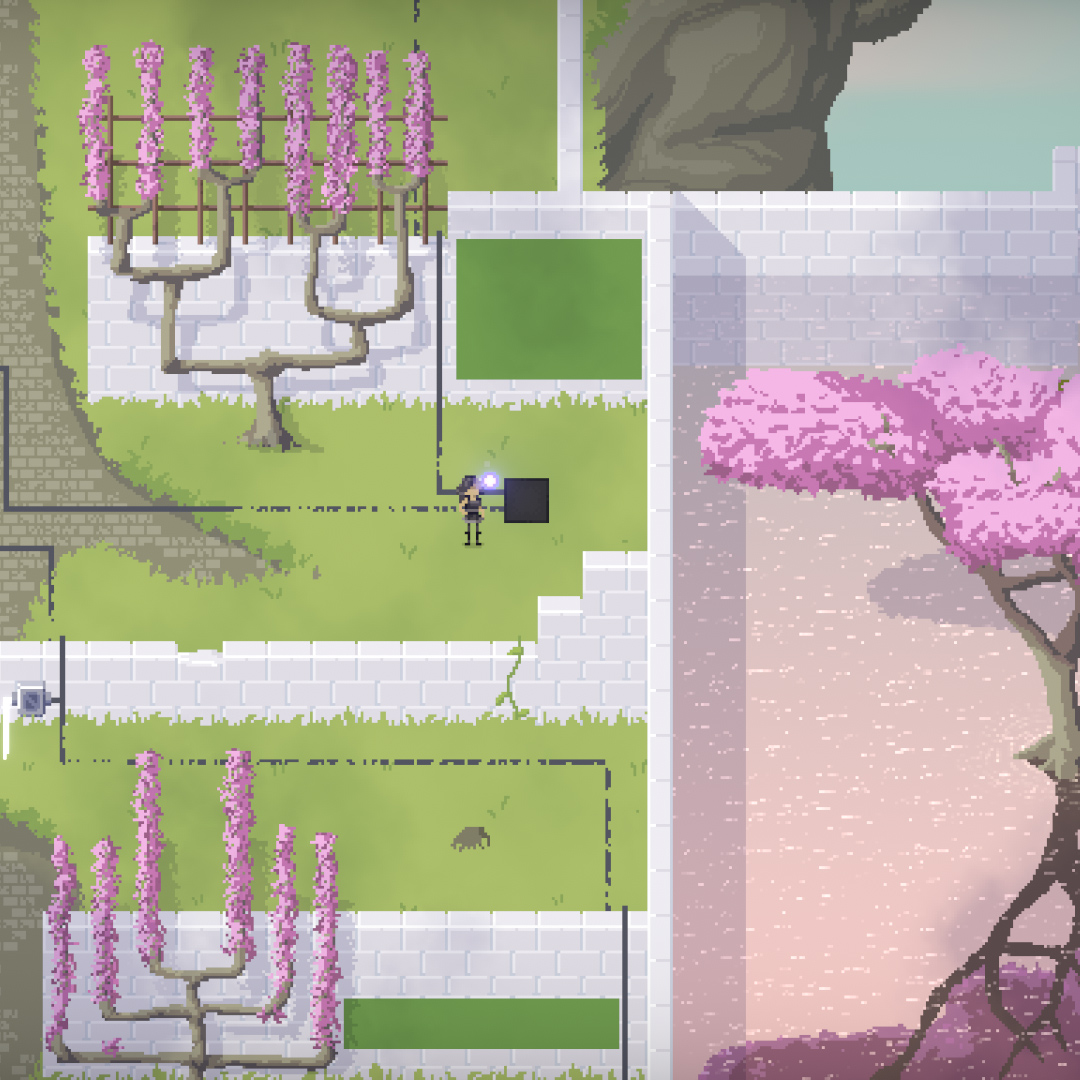
Here are a couple screenshots of the “arted up” areas.
Overall, I’d say I’m fairly happy with how the artwork has been coming along. The game seems like it might actually not look terrible, and might have something approaching a unified art style. It is admittedly a bit time-consuming to get this level of fidelity, but I think the results speak for themselves.
Testing
The other thing that I’m doing this week, is another round of playtesting. I’m pretty sure the next development steps are going to involve cutting a bunch of puzzles. However, I want to get a more broad base of feedback so I can make more informed decisions about where I should let certain things stay in the game and what areas might feel too tedious or drawn out.
Apologies if you’ve been on the testing waiting list for a long time. Feel free to hit me up in the comments, or on twitter, if you’re interested in testing sometime soon. (Or if you expressed your interest a long time ago and are becoming irate)
The Plateau
I have to admit, I’ve been feeling a bit wore out lately. I haven’t worked full time on a game for many years, and it can be exhausting. No matter how much you love a project, it will always go through ups and downs.
I guess I would say that I’ve reached a new plateau. There’s a certain amount of satisfaction mixed with depression that hits whenever I hit one of these new plateaus. In one sense, the game is clearly better than it’s ever been, but it’s also clear how much I could still improve things. Reaching one plateau means I now have to plan the route to the next plateau.
I’ve already taken some of those first steps though. One of the biggest ones was making this overhaul to the panel interaction method. I had been putting that one off for a long time, as there were still so many easy wins in sight on the puzzle design. Now I have migrated everything over, and the puzzle design challenges seem daunting in comparison. I don’t lack for ideas, but I do lack somewhat for the energy.
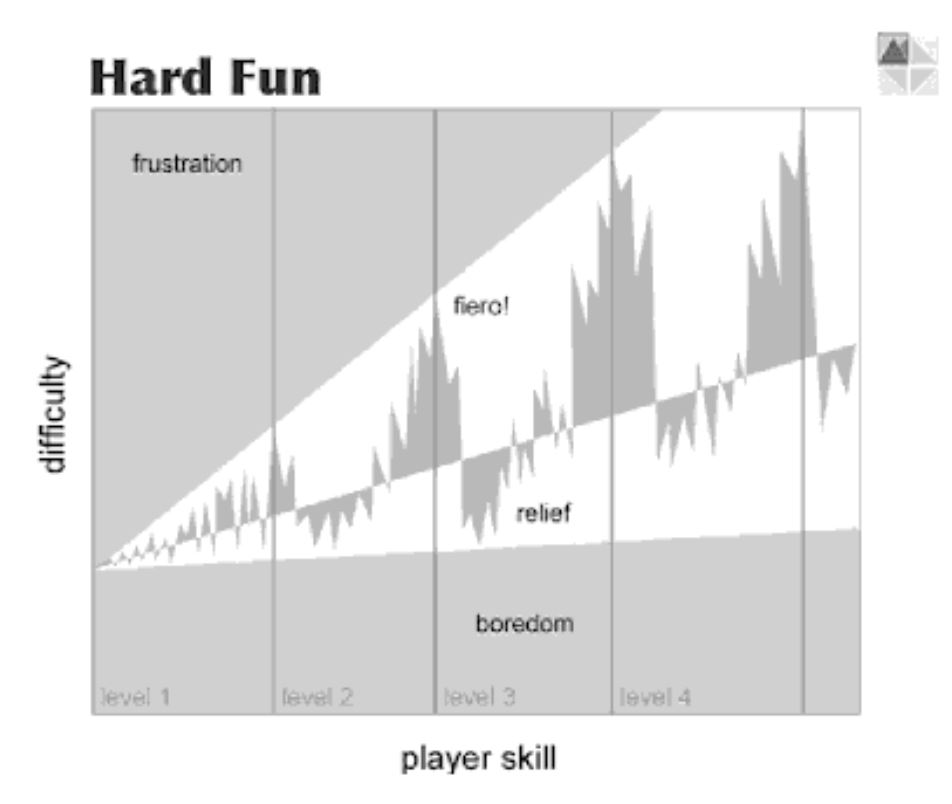
(diagram from The Human-Computer Interaction Handbook)
In the diagram of flow state, I’d say I’m more in the frustration section than the fiero section. I feel a bit overwhelmed and stymied. I’m sure I’ll get back into the zone soon enough though.
So, after much deliberation and gnashing of teeth, I have finally begun…
…to write a new devlog post…
I kid I kid.
I’ve finally begun overhauling the way in which the player interacts with panels…to be the way it was when I first started building the game.
The “new panel system for the game
The visuals are a bit WIP, but I do think I want to adopt the look of the walkaround panels for these starting tiles, as they will mostly function the same way. The player has to stand on them to see the puzzle or interact with the starting tile, and clicking the starting tile or pressing the spacebar will depress it. Depressing the tile, in this case, submits the current state of the panel for solution checking.
Way back in 2015 when I first started working on Taiji, in order to create a simpler interface for interaction, I adopted a modal system wherein the player would walk up to a tile in front of each puzzle and press a button in order to be put into “puzzle mode”. In puzzle mode, their normal walking controls would instead move around a cursor on the panel (ala Tetris Attack, Lumines, and many action puzzle games).
The original panel system for the game (apologies for the mouse cursor) (character art by @martin_cohen)
Obviously I’m joking somewhat about the new system being exactly the same, but it is an interesting case where I believe when I changed the panel interaction to be free cursor based, with a secondary input controlling the cursor. I may have thrown out the baby with the bathwater somewhat. At least part of the baby.
See, the main benefit I can get by moving back to this “starting tile” approach, is that I can fit way more panels in a small world area. Panels that would have otherwise physically overlapped, can now be made to be only visible when the player is standing on their starting tile.
Obviously, this was not present in the first version of the panel system, and was instead sort of a “worst of both worlds” approach where the panels had to take up a large amount of world space, and the player couldn’t interact with them unless they navigated their avatar to the starting tile. (To add additional insult to injury, I had separate buttons for entering and exiting a puzzle, and exiting a puzzle before solving would reset the panel.
A second benefit I get with this change is that I can prevent accidental solutions by requiring the player to manually submit the current state for checking. Previously, the solution was checked each and every time the player toggled a tile. Because the player will most likely only press the “check solution” button when they think they might have solved the panel, the player and game will only ever be out of sync when the player was actually wrong. No more situations where you’re reasoning your way towards something, only to be interrupted partway through by the sound of the panel being solved.
As a final bonus, which I’m sure no one will care about, it makes the player avatar a bit more important in general navigation and puzzle solving. This fact may or may not be utilized later…
It’s been too long since I wrote a devlog entry. Mostly this has been because I’ve been doing a lot of nitty gritty puzzle design stuff, and I try to keep the blog posts fairly high level so that people can read without getting too spoiled on specific puzzles. I’ve been working through the checklist for the next test build, which involves time-consuming revisions to most of the areas in the game.
The most recent area I’ve finished revising is the “dice” puzzles. Here’s a birds-eye comparison shot between the area “pre-revision” and after. The right version is the new and revised area.
Left: Old Right: New and Improved!
You’ll notice that the overall structure of the area hasn’t changed too much, but internally there have been a lot of changes. Both some entire sets of puzzles have been added, as well as some of the earlier puzzles have been cut or moved to other areas.
I thought it might be fun to put this image alongside the previous revisions of this area, so you can see four different versions of the same area side-by-side.
Progress? The earliest version is on the left, and latest on the right.
Needless to say, the area has continued to evolve over the years, and will most likely see more changes in the future. The continuing level of flux is the main reason why it’s all still using prototype graphics. Luckily I feel like things are starting to congeal a bit more, so I should be able to start “arting it up” pretty soon.
There are 60 puzzles in the newest version of the area, although it may change to where the player is only required to solve a much smaller subset to “complete” the area.
Area Completion
Speaking of completing areas, I added a fun little effect that happens when you finish an area. This gives the player a bit more satisfaction at that moment and leaves them with little confusion as to whether they need to do more to finish the area.
Puzzle obscured to prevent spoilers.
I may or may not get it in for the next round of testing, but I’d also like to add a warp that allows the player to warp back to the central hub area after finishing a world.
World-Space Cursor
Something else that I spent an inordinate amount of time on over the past month or so is implementing a mouse cursor that exists in world-space instead of screen space.
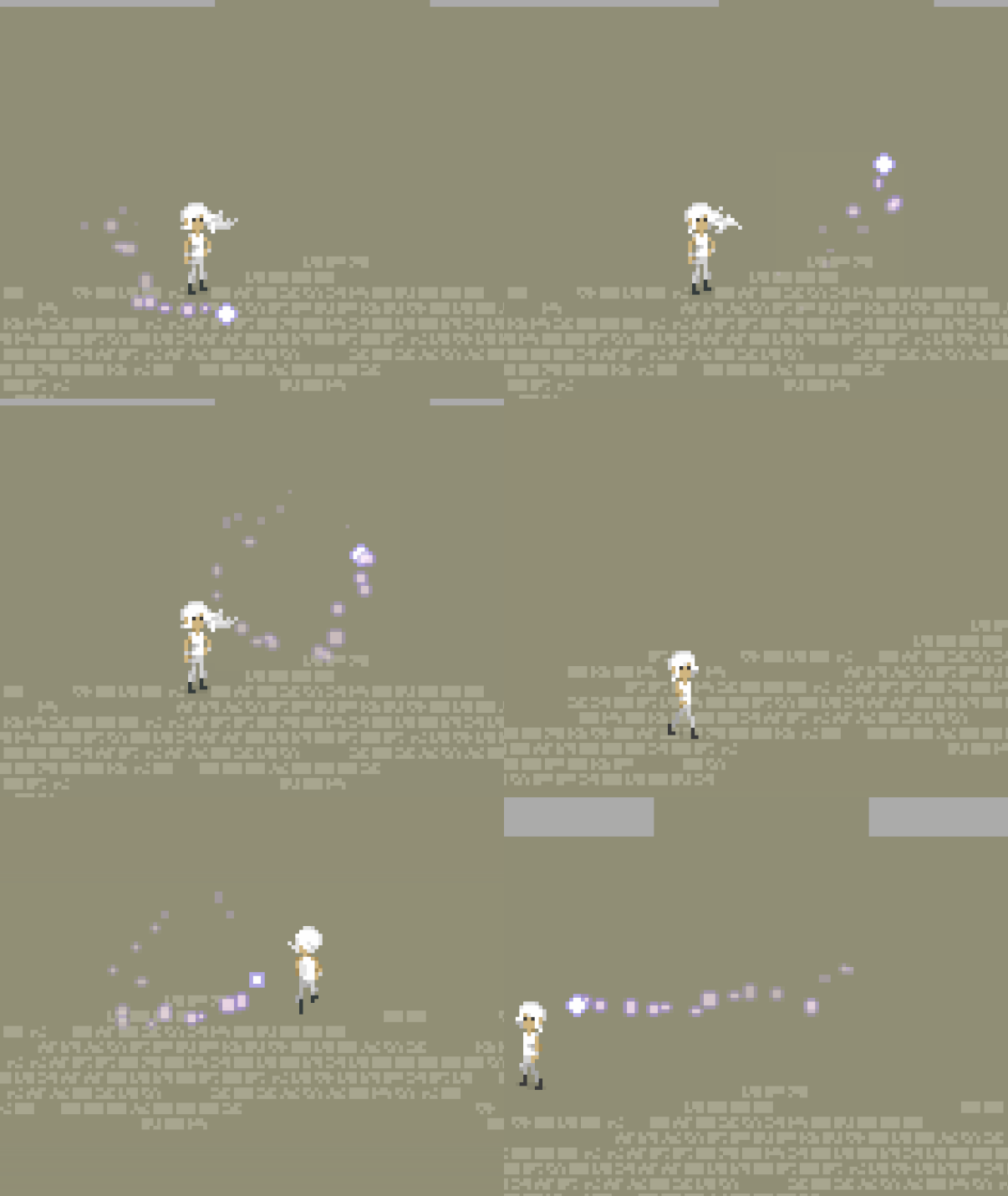
This means that when the camera moves, the cursor will be fixed relative to the world. For example. if the player was interacting with a puzzle panel, and the camera moved, the mouse cursor would continue to hover over the tile on the panel that the player was originally pointing it at.
You can see a comparison below, screen-space is on the top and world-space is on the bottom. The mouse cursor is represented by a fairy.
This is good because it allows me the flexibility to move the camera without having to worry about negatively impacting the players experience.
However, since I’ve had some people complain about the possibility of this being disorienting or annoying, I’ve decided to maintain the old cursor system in parallel with the new one, until such time as I decide that the world-space cursor (or the old one) is better and I don’t need the other.
These past few days have been relatively productive, but in a way that hasn’t really changed anything about the actual game if you sat down to play it. Recently it’s felt like every time I go to add something, I’m needing to clean up a lot of cruft first. I suppose this is normal for this stage of development, but it does feel a bit like wading through mud from time to time and has been slowing down development progress. Furthermore, although it might be appreciably nicer to work with the code after a good long day of refactoring. It’s boring as crap to talk about what I did.
I finished up the meta-tiles in the manner I mentioned in the previous post. Getting them to work alongside the dice face mechanic and the walk-able puzzles was fairly straightforward. Mostly because of the choice I made to use meta-tile numbers for all of the run-time puzzle calculations. The current implementation of the area search feels like it’s a bit inefficient, but it works so I’m happy enough.
Part of how I managed to get everything working relatively quickly is that I created a nice little helper function that looks up the meta-tile for any given (x,y) position and sets it to a certain state. This means most of my old algorithms work just the same; I can just drop in this setMetatile() function in place of my old calls to set individual tiles, and I’m good to go.
I’m still using the connections-based approach for the puzzle editor, but I may end up changing that as well. As I mentioned before, although switching to editing the meta-tile numbers directly might make building puzzles a bit more time consuming, it would also give me higher precision and allow me to implement some puzzle types that I don’t currently have. So, it’s probably worth it.
There are some other interesting details that came alongside the implementation for the walk-able puzzles, but I don’t want to spoil everything!
As I’ve said previously, I mostly implemented these metatiles because it felt like something obvious that was missing. This is a bit strange feeling, because I don’t have any immediate plans for puzzles involving them. I do hope to find some, but usually I don’t do this much work before I even know if the idea is going to bear fruit.
Normally, I use a process for prototyping new puzzle ideas that is intended to reduce the amount of wasted implementation work as much as possible. I start with prototyping ideas on paper. Just drawing stuff out in a notebook of graph paper. Then, if I see some potential there, I will usually implement a bare bones version of the mechanic into the game, without much thought for what it looks like. In this case, I think the mechanic itself ended up being just complex enough that it was pretty hard for me to paper prototype it, and just visual enough that it was difficult for me to digitally prototype it without doing a fair amount of implementation work.
I think there’s a similar situation in my mind with any puzzles that have to do details in the visual element of the game. Those kinds of visual puzzles tend to be rather subtle, and as long as the game has programmer art, there are only so many ideas that are going to come to my mind. Simply enough, the elements necessary to build the puzzles just aren’t there yet.
In any case, I hope to find some good puzzles.
P.S. I still have yet to upload the higher-quality archives for the past 4 development streams, including two I did in the past week. So look forward to that before too long.
After making the changes to the “dice face” puzzles which I described in a previous blog post, I ended up with a few edge case puzzles which didn’t work under the new mechanic, but were still within the boundary of the game’s subject matter. This meant that I would need to do some extra engineering to keep these puzzles working the same way. This caused me to confront some of the growing problems with my puzzle design tool.
Here’s a screenshot of the old interface:
This is the tool that I use to design all of the puzzles in Taiji. Although it has been perfectly serviceable, it was starting to take up a bunch of vertical space, and there are additionally a bunch of very subtle details which were starting to make it icky to work with on a regular basis. Additionally, if I want to add more functionality (which I do), it was becoming very unclear how I was going to add it, both in the interface, and the underlying code.
So I have done a bunch of under-the-hood work, which although completely invisible to players, allows me to clean up the code andrevise the puzzle designer interface.
This is how it looks now:
Although also somewhat complex, it actually has more functionality than the interface shown above, while taking up a bit less space. (Admittedly, these aren’t the same puzzle, so it’s not a 1:1 comparison, but I don’t really want to take the extra time to grab a better screenshot right now.
There are still some more improvements that I’d like to make, including basic ones like making sure all the input boxes still line up when there are disabled tiles on the panel, but overall I am much happier with the interface and the underlying structure of the code going forward, and I think it will definitely be more amenable to adding new functionality.
You may have noticed that I haven’t been posting updates for the past few weeks. My computer hasn’t been hooked up and so I couldn’t work on the game. Instead I’ve been finishing off a major move.
The house we’ve moved into really should have been cleaned before we moved into it, so it’s been a bit of a challenge to clean thoroughly with all our stuff in the house. So a lot of that has been happening, as well as repairs and general moving stuff. Still hard to relax as most things are not really “in their right place.”
I did finish setting up my computer and desk and did a short test stream earlier this week to see if the internet here was decent enough to use for streaming (in short: it isn’t). So, barring a miracle, if I do any work streams going forward, they will be more of the Starbucks variety that they were a few years ago.
Unfortunately, I didn’t really find the gumption to sit down and work on the game any more than just that short test stream. On the stream, I added a little bit of a color difference for the puzzle panel backgrounds depending on whether or not there are active tiles.
It’s a pretty small change, but it should make panels a bit less confusing for new players. I’m still not 100% happy with the look, but it’s a step in the right direction.
I’m hoping to get some more done on the game in this next week. Still lots to do around the house though, so we’ll see.
Seems like I’m writing these things on Mondays most of the time now…
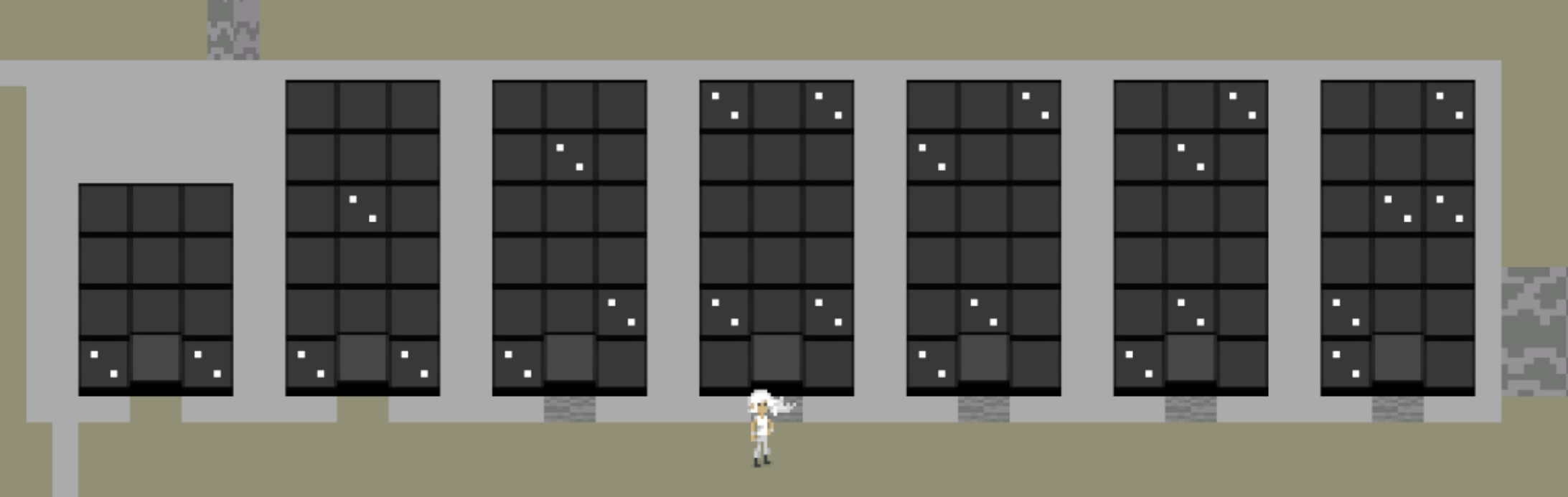
Didn’t get a whole lot done over the weekend, at least not visibly. Most of the work was under the hood or maintenance. I repaired the puzzles which mix the “dice” and “dot” mechanics, after having changed the way the dice mechanics work. The combined puzzle sequence stills need a lot of work to be enjoyable to solve, but at least the puzzles aren’t actively broken anymore.
I got them working again through a small change to how puzzle solutions are validated. Previously, with the dot mechanic, whenever the color of two dots needed to be checked, the code would use an arbitrary number which specified which color dot we were talking about. (i.e. 60 = blue dot, 61 = yellow dot, 62 = red dot, etc.) The change I decided to make is to have it actually directly compare the color values of the two symbols in question. (Technically I compare an integer hash of the color to avoid the == operator overhead of Unity’s built-in color class) Directly comparing colors has a couple benefits when it comes to simplifying the code and also makes future puzzle possibilities much easier.
I didn’t end up revamping the entire puzzle panel system, because after some further investigation, there are some good reasons that I architected it the way that I did, in spite of the fact that it’s unwieldy at times. The main reason is that I’m relying on the Unity serialization system to save the panel layouts, and certain data formats just serialize more straightforwardly and quickly. One dimensional data type arrays are the most easily serializable format. So, even though it would be more useful to have a single tile structure which stores all the relevant data, including references to spawned GameObjects at runtime, it is a bit more challenging to implement than it would immediately seem.
Furthermore, serialization can get real nasty when dealing with null references, as stated on this page in the Unity docs:
Consider how many allocations are made when deserializing a MonoBehaviour that uses the following script.
class Test : MonoBehaviour
{
public Trouble t;
}
[Serializable]
class Trouble
{
public Trouble t1;
public Trouble t2;
public Trouble t3;
}
It wouldn’t be strange to expect one allocation: That of the Test object. It also wouldn’t be strange to expect two allocations: One for the Test object and one for a Trouble object.
However, Unity actually makes more than a thousand allocations. The serializer does not support null. If it serializes an object, and a field is null, Unity instantiates a new object of that type, and serializes that. Obviously this could lead to infinite cycles, so there is a depth limit of seven levels. At that point Unity stops serializing fields that have types of custom classes, structs, lists, or arrays.
Since so many of Unity’s subsystems build on top of the serialization system, this unexpectedly large serialization stream for the Test MonoBehaviour causes all these subsystems to perform more slowly than necessary.
I may yet return to make some more of those changes, but you can see that the water is fraught with peril. A good approach would probably be to have two formats, one for all of the runtime code, and one that is used for serialization, but this would also create a bunch of potentially slow startup code every time the game was run in order to translate between the data formats (and there’s already more initialization code for the panels than I really want there to be)
On a humorous note, before some of the changes I made, I had this monstrosity of a line of code:
symbol = litSquares[p.x+width*p.y].GetComponent().transform.GetChild(1).gameObject.GetComponent();
And now, with some data restructuring and a few helper aliases, it becomes the much more manageable:
Bit of a short update this week, but I’ve been busy with life things (moving, putting in a mailbox for four hours), and I didn’t have much free time left to work done on the game.
A few posts back, I wrote about some ideas for revamping the “dice face” mechanic to remove the requirement that the player remember that “white = black” for every panel in order to solve it. So this weekend I worked on taking some steps there. That work was streamed live, so if you want all the details, you can check out the archive here.(although there are a few spots where YouTube didn’t like the music and I had to mute the audio)
I will still have to redesign the start of the area in order to have more interesting puzzles, but I am fairly happy with how the change went. In fact, there are now some interesting ambiguities to play with there that I can probably exploit for more depth.
This sequence already sees a significant improvement from the change to the mechanic.
Unwieldy Puzzle Panel System
I probably need to make some changes to the puzzle panel system in the game, both in order to accommodate a few of the existing puzzles which have become broken after changing the dice face mechanic, as well as for some new ideas that I haven’t implemented yet. I am pretty concerned about how to go about making these changes, particularly without fundamentally changing the way that the puzzle panels themselves are implemented.
Some of the unwieldy aspects are just the interface I use for editing puzzles, but I think the main issue is caused by a design choice that I made early on to shrink the memory footprint of the panels themselves. Essentially, each puzzle panel is just a series of 2D arrays (technically stored as 1D with width and height variables) for each thing that we might want to know about the tiles on the panel.
This was not really a big deal when there were only a few things that we might want to know about the tiles, but at this point, there are 5 different arrays for each panel. That’s not an obscene number, but I am fairly certain that to accommodate all the features I want, I will need to add 2 or 3 more arrays. That’s 8 different arrays that all have to be shuffled around separately.
At that point, it becomes pretty obvious that the data related to each tile should be bundled up. That way we can work with just one array of structs or objects that stores all the relevant data, and easily expand the structure and support each new additional feature without many unexpected code changes.
I have a few concerns with how this will affect the saving/loading code system, but it hopefully shouldn’t be too bad. Overall, it’s just a big revamping project on a core system and I never look forward to those because you end up touching a lot more code than you expected to and possibly breaking some things in the process.
So, I’ve finally finished up auditing all the puzzles in the game. Essentially, just solving them all and taking notes on what might need to be improved or removed. Overall, I think the game is in a pretty good place moving forward. There are some areas that I’m pretty happy with as is, but there is still a lot of work to be done to improve some other areas. Obviously this is just considering design work. Let’s not even get into how behind the curve I am from an aesthetic point of view.
Early Accessibility
This week, I chatted with a deaf accessibility advocate for games. This was an interesting and challenging conversation, and has left me thinking a little bit about what’s involved in making a game more accessible, and how that intersects with the design of Taiji. Obviously, I think that accessibility is an important and often ill-addressed concern, and my goal with the game is to never make a puzzle difficult for reasons that have nothing to do with its subject matter.
However, I think there is some tension between accessibility concerns and the pursuit of particular subject matter. As an example, if you want to do puzzles that are “about sound”, deaf people will unfortunately, but necessarily, be excluded.
It is easy to see why making a puzzle that relies on pure audio cues is a bad move from an accessibility standpoint. In many cases, it would be easy to make additional visual cues, and to not do so can simply be chalked up to laziness.
But my big question is, are there particular cases when not adding those cues can be justified? And if there are, what are they?
Some of my thoughts on this are a bit hard to clarify without specifically addressing and spoiling some of the puzzles planned for Taiji. Even still, after discussing the details of the puzzles with the aforementioned accessibility advocate, they did not seem particularly convinced that there was any tension other than my laziness and lack of care.
Similar concerns arose in the wake of the release of The Witness. There are some puzzles in that game which people who are color-blind or hard of hearing will have trouble with, or may simply find impossible without just looking up the solutions. Because of this, the designer—Jonathan Blow—has been called callous, “ableist”, or at best unconcerned about accessibility. The last one is particularly strange, considering the game received a PC patch to add a click-to-move mode, and nearly all of the puzzles in the game—including many that use color as a cue—are designed to be as accessible as possible; symmetry puzzles that care about colored hexagons using cyan and yellow, for example. In my last point of defense of Jon Blow before I move on, he has been quoted saying that he wanted to ship the game with a puzzle which only color-blind people would be able to solve, however in this case he was hamstrung by the the poor color consistency of most display technology.
So, what is the reason to make those kinds of decisions? To create puzzles which by their very nature exclude certain people from fully enjoying your game? Jon Blow says it is because the puzzles in The Witness are all “about things.” I agree with this sentiment, but it perhaps requires a bit more clarification to even make sense.
In many puzzle games, the “point” of the puzzles is essentially to be a challenge. The puzzles are meant to be hard for the player to solve, and probably fun as well. In games like The Witness (or Taiji, for that matter) the point of the puzzles is significantly subtler. The puzzles are intended to be interestingand, about something real. By “real” I mean that the subject matter is, at best, not confined simply to the game. The thinking that a player will do when solving the puzzles can be taken with them back into the real world.
It may seem a bit callous, but it should go without saying that both sound and color are phenomena that really exist, even if some people cannot experience them.
This can seem to lead down a path of reckless disregard for other people, so I think it is also very important to emphasize that what I’m talking about here—both in my own case and the case of The Witness—are puzzle games.These are games that, by design, will exclude people who are simply not intelligent enough to complete all of the puzzles in the game.
So What?
Perhaps all of this can just be seen as a long elaboration intended to serve as an excuse for my laziness, or “ableism”, or perhaps some other unidentified flaw of character. However, I still have not addressed the core issue:
What am I going to do about accessibility?
Currently the plan is to make the game as accessible as I can. When puzzles involve the use of color for separation, but are not explicitly aboutcolor, I will endeavor to choose colors that will work for as many people as possible for that purpose.
But what about when puzzles areexplicitly about those things? What about puzzles about sound, for example?
In these cases, I will primarily design the puzzles with the intent of pursuing the subject matter that interests me. If I have to choose between a puzzle which can be made accessible or painting myself into an inaccessible but more interesting corner, I will most likely choose the corner.
However, I also intend to provide some level of assistance when possible. This, in itself is a tricky proposition, because I do not simply want to condescend to players who are using the assistance options. In essence, adding accessibility seems as though it will often amount to designing an entirely different set of puzzles. The puzzles therefore must be interesting in their own unique ways, and must endeavor to be analogous to, and at least as challenging as, the inaccessible puzzles.
Perhaps this will not be enough, or not even be possible. After all, I am mostly opining here without having fully designed any set of puzzles like this. But I think this is the best way for me to balance these two ideals: accessibility and truth.
Addendum
I want to clarify a couple things: What exactly is the difference between a puzzle which is about sound or color and one that simply uses it as a cue. And why do I think that the former cannot be made accessible without simply designing a different set of puzzles?
To do so will require spoiling a couple puzzles. The Witness is a hugely broad puzzle game, so I can actually find examples in both the positive and the negative without talking about any other game.
Spoiler Warning: If you have not completed the two areas shown below in The Witness, then avoid reading further.
The Keep (left) and The Jungle (right) in The Witness
The Keep
So, in the example of puzzles which simply use audio as a cue, but are not really aboutsound; we have the example from The Keep. The third hedge maze puzzle in the front courtyard must be entirely solved by listening to the loudness of your footsteps while walking on the gravel pavement inside it. The maze on the panel matches the shape of the hedge maze which contains it, and particularly crunchy spots found while walking through the physical maze denote an area to be avoided when drawing a corresponding path through the maze on the panel.
The reason that I say this is not a puzzle about sound, is that it would work just as well if you simply wrote out separate captions for the footstep sounds. The softer ones being written as “crunch“, and the louder ones being written as “CRUNCH“. The puzzle would essentially work the same.
It is important here to note the difference between subtitles and captions. Subtitles only show you spoken dialogue, whereas captions will also give you a textual indication of important audio cues.
The actual puzzle here is about noticingthat the loudness of the footstep might be important, and then figuring out in what way. The argument against accessibility here is that hearing players are inundated with the sound of their footsteps throughout the whole game, and so this is a subtle thing to notice. Consequently, captions would be much less subtle.
I think this is actually not a very good argument: First, it isn’t really thatsubtle, as the important footstep sound is unusually loud here. And secondly, if the consistency is really that important, just put captions on all of the footstep sounds in the game. Make them small and unobtrusive if you have to.
Sadly, The Witness does not support captions at all, and therefore this puzzle is impossible for deaf players without simply looking it up.
The Jungle
So, in the positive example, we have the puzzles in the Jungle. These are puzzles that are actually aboutsound, or more specifically: about hearing. This will be harder to explain, because the puzzles themselves are much more subtle.
First, if you need a refresher on the content of these puzzles, I actually have an analysis video on the first half of this area, in which I discuss some of the subtle details involved:
Now, I want to bring the attention to my specific point earlier. Why do I think that these puzzles cannot be made accessible without simply making a different set of puzzles?
In this area, the essential task that the player is doing is listening to some bird songs, and transcribing the different pitches of the notes onto the panel. One could easily imagine some sort of analogous visual cue: a series of mechanical birds which all chirp in time with the notes, and are set on branches of varying height, with the height of the branch corresponding to the pitch of the note.
This type of cue would in fact work quite well, but only for the first three puzzles in the sequence. Past that point, the puzzles begin to play with both the particular difficulty of distinguishing different notes by ear, and the way in which we focus our attention on certain sounds by filtering out others. Both to our benefit and our detriment.
Perhaps again, there could be some analogous changes to our cues here. Perhaps the birds start out in linear order as they would be on the panel, but they begin to be shuffled up, and the player must watch the order in which they chirp. Perhaps the branches which the birds are situated on begin to blow in the breeze, and so it is more difficult to tell which bird is supposed to be higher. Perhaps there is a branch which is broken and the bird has fallen onto the ground. Perhaps there are birds which are not situated on branches at all, and they are irrelevant. These could be interesting ways to evolve the sequence, but what I am trying to argue is not that the puzzles cannot be made accessible, but that by doing so, they are now puzzles which are fundamentally about something different.
They are no longer puzzles about sound, and now are puzzles about spatial relationships between moving objects.
Does this make these accessible puzzles bad? No. But it does make them different puzzles.