24. I’d Appreciate Input

I’ve been extra busy the past two weeks prepping a build for testing, so I unfortunately forgot last week to write a post about what I’ve been doing.

It’s been around 8 months since the last test build that I did, and just testing out the new interface would’ve perhaps been enough, but instead I decided to make some changes, both to the existing areas as well as putting in a first draft of an area for the dot mechanic.

I made a list of tasks that I wanted to accomplish for this specific test build, and set about doing those a bit more diligently. I’d say this is generally a good idea if you want to ship anything: to set out the bullet-points that you need to hit and focus your efforts there. Unfortunately, I still took longer than I expected and didn’t get all of the things on the list done, primarily because I kept subdividing and expanding the tasks.

One of those tasks was to provide a basic tutorial at the start of the game, essentially just a readout with the controls floating in the area near where the player first starts. The issue there is that in order to show the proper controls I need to know if the player is using the mouse/keyboard controls or a gamepad, and it was surprisingly difficult to get this type of information with the input system that I was using.

That system was what I think was a pretty standard system built with the default Unity input system. I had inputs with labels like “Run Button” and “Toggle” and those were mapped to different actions in the game, and different buttons and keys. Unity doesn’t really support automatically remapping these inputs to a bunch of different controller types however, so I had to make a system on top of that where I would have a “XB” and “PS4” version of each input label and then just use some string concatenation to build the proper input strings at runtime based on the name of the input device (which unity thankfully does let me access). But by the time the inputs got to my code, I couldn’t tell whether or not they were coming from a controller or not, as both the XB and PS4 versions of inputs were doubly mapped to keyboard controls as well.

So, I decided to rip out and replace the entire input system in order to get that functionality, as well as to simplify the whole thing for any future input complexities.

In Unity, there’s really only so much you can do without just writing an external dll and handling the input at the OS level (which I may still consider doing). It seemed like the simplest and most straightforward thing to do was to get all of the raw input data that I can out of Unity’s system and then handle the rest entirely in C# code.

The way this worked out in practice was pretty straightforward for the buttons, as unity will just let me poll the event system and has keycodes for all joystick button numbers. With the axes however, I needed to set up input types in the Unity editor just to be able to collect them. I named the inputs “joystick 1 axis 0” through “joystick 1 axis 9”, and set them each to get the axis that matched their name. Although it’s a bit janky, with some string concatenation I now can get all the input info pretty easily into the scripting layer of Unity.

So, once I have all this input data, I need to know what to do with it. In a similar way to the previous input system, I get the name of the controller from Unity and compare it against known strings for each controller type (Xbox 360 or PS4, at the moment, as that’s what I have to test). If I find a controller matching that type, then I set the button mapping for a virtual controller (sort of a platonic ideal of an xbox 360 gamepad) to be equivalent to some pre-mapped structures which simply store the relationship between say, the A button, and a numbered button for that actual controller according to the Unity input system.

I also store another virtual controller for the PC inputs, but here there’s not really an input map. I simply hard map certain keyboard keys to the equivalent buttons. The mouse is stored separately, as it doesn’t exactly correspond to a controller input.

Additionally, whenever I poll each input (whether it be a keyboard press or a button), I update a variable which says where the last input came from,. This is then used to update the final virtual controller state that the game sees. I can also use it later to tell which virtual controller the latest input came from.

Perhaps it’s a bit difficult to explain, but I’ll try to diagram it below:
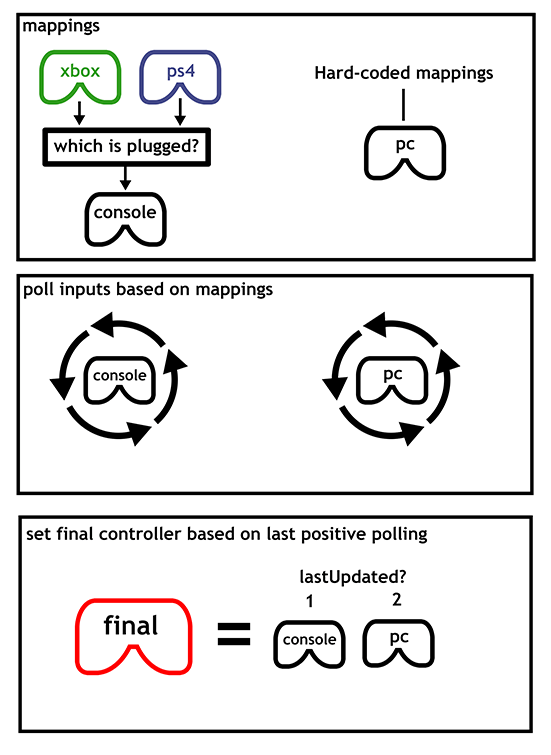
inputsystemdiagram2.png

Overall, I am pretty happy with the results, and it solved the problem of knowing whether or not the player is currently using a controller or the PC controls. However, I still have some old virtual controller management code sitting on top of all of this that I would like to eliminate before I call this system completely rebuilt.

I plan on writing another post this week on some of my thoughts about the testing feedback, but for now I think I will leave it at that. 🙂

Oh, and here’s what the current controls readout looks like in game:03-20-17_20-10-10-1010.png

20. New Mechanics Ahoy!

This week, I’ve finally finished up the replacement interface enough to get back into designing puzzles. At first, I returned to a mechanic that I was in the middle of prototyping when I took a break from working on the game, but after some thinking, I realized there are some issues with it that I don’t know how to resolve yet.

As I mentioned in an earlier blog post about the mechanic, it’s a good mechanic as far as orthogonality goes, but the issue is that it just doesn’t stand on its own very well. It only really gets interesting when it’s combined with the other mechanics. This might be fine if it was a purely augmentative mechanic, but it isn’t.

Additionally, it’s a big goal for the design of this game to have the player solve puzzles without requiring verbal hints, and unfortunately this mechanic is non-trivial to teach the player this way. Essentially, it’s a difficult concept to grasp that doesn’t actually go very deep once you do grasp it. So, it doesn’t feel very rewarding. Until I come up with some changes to the way it works that make it deeper, or at least much easier to teach, I have decided to shelve it in favor of trying something else.

(By the way, As I mentioned in the previous post, I’ve been live-streaming some design/programming work on the game on twitch, so you can see some of this new mechanic being prototyped in the archives here.)

That New Mechanic

So as for the new mechanic, I’m not going to go in-depth about how it works, as I want to maintain a bit of mystery about the game. A big part of the game is the sense of discovery, coming upon some inscrutable thing and poking and prodding at it in order to figure out what’s going on.

But, the important thing to note is that so far this mechanic is working out much better than the last one. It creates interesting and subtle puzzles which are just as good as the others in the game. I am still in the process of seeing how deep it goes and how well it interacts with the other mechanics in the game, but in the meantime I will let you look at some of these new puzzles in an unsolved form and speculate on their meaning.

dotpuzzles
Let’s just call it “the dot mechanic”

The only thing that I will say about the mechanic is that it primarily came to mind when I stopped being so worried about whether or not I was cribbing ideas from The Witness. In my mind, it’s pretty similar to one of the mechanics in that game, but due to the fact that the interaction method of the puzzles in my game is quite different, the way in which it manifests is actually pretty unique.

Day Job and Productivity

So, the other big thing that’s happened this week is that I’ve gone back to my day job. This poses a bit of a problem as it’s usually quite difficult for me to maintain a good work momentum when I’m also working 8 hours a day. Thankfully (or perhaps not, if you ask my wallet), I haven’t been working a lot of hours this week, so I’ve still been pretty productive.

I just hope that I can keep up some level of momentum on the game as my hours pick up at the job. Part of my issue is that when I put the game down for a day or two, I start to over-analyze everything and worry too much about whether or not I’m taking the right steps.

By now I should have realized that it’s more important to just keep moving than it is to be certain that I’m not making a mistake. I can always course-correct later, and I even if I think about it all day before making a decision, I only have so much information. Scrapping and redoing thing is just part of the process, even if it is still pretty uncomfortable for me.

19. Finalizing Up the New Interface

First, I’d like to notify anyone who is following the blog that I have recently been streaming development of the game over on twitch, so follow the channel there and ask to be notified when it goes live. If you missed the stream, you can find a complete archive of all the development streams on my YouTube channel.

So, at the time of the last entry, I was struck with the problem of resolving the ambiguity between the point-and-click type panels and the walk-around type panels, in that they looked pretty much the same. I was also considering abandoning the point-and-click interface as a solution.

This week, I did some more iteration on the artwork for the snake panels, and I’ve reached something that I’m pretty happy with, overall.

Primarily, It is clearly distinguishable from the point-and-click panels. But it also solves a lot of the other small issues that the panels had: The start tiles are clearly elevated compared to the other tiles, and for panels where the player can start on any tile, the startable tiles subtly depress and show a small highlight, encouraging the player to press a button to activate the panel.

newsnakepuzzledesign.gif

I did some other cool interface readability work, but I won’t post it here because spoilers!

The Nitty Gritty Stuff

Mostly though, this week has been technical work.

I did some general performance optimizations when it comes to the panels. They weren’t running terribly, but it seemed like a good time to clean up a lot of the code because I am close to finished with the new interface and know what I need to keep around. Also, there were just some dead wrong things I was doing with regards to solution validation on panels that were eating up CPU cycles. One of them was a bit of a “how did this ever work?” type issue.

Another nice to have feature, which really doesn’t impact the player’s experience much, is Unity’ live script reloading feature. I had broken it at some point for the puzzle panels, and I took the time to investigate why and fix the problem. It was relatively simple, with the only real issue being that I was storing some gameObject references using multi-dimensional arrays, and (amazingly) Unity does not serialize multi-dim arrays.. In order to fix that, I just replaced the multi-dimensional arrays with single dimensional ones and just use [x+width*y] every time I want to access them. I’m still not super happy with this solution, but it at least got the script reloading working.

There was a minor additional snag when trying to get the script reloading working. Which is that even though it was actually working, I couldn’t tell because part of my code didn’t think the panels were visible on-screen and was disabling them (premature optimization bites me again!) The issue here was again just serialization, although most of the panel was getting serialized properly, the bounding box structures that I use to determine visibility were still getting destroyed on script reloads, so all the panels would fail the visiblity check on script reload. Oops!

The rest of the work that I did this week was just about ensuring that all of the existing puzzles are still solvable using the new interface paradigm. There are currently 138 puzzles in the game, which may not seem like a lot, but it’s enough that it can be a bit hard to remember what features all of them do or didn’t use.

As of now, there are only two more small things on the list to implement and the game will be fully playable again, which is great.

Only major bummer is that I have a cold, and I have to go back to my day job in three days.

18. Interface Work and Concept Art

This week, I have been pretty happy with my productivity on the game. I actually did a couple of development streams for the first time in like 6 months at least.

So, what exactly have I been up to this week?

Concept Art

One of the items on the tasklist for the game ever since I started thinking about doing the art myself was to try to do a full concept piece, in order to get some kind of idea of what an area in the game might look like in the style I’ve been working in. After all, doodles are nice but they don’t really look like a game.

So, the piece that I decided to do is intended to be a take on the starting are of the game, which is a floating island.

taijistartconcept2x

Obviously this is super WIP, and I wouldn’t necessarily expect the final version of this area to look anything like this, or the final art to resemble this beyond the broad strokes. But overall, I’m pretty happy with the way it came out.

Interface Redesigning

The main subject of my streams where I was working on the game was the issue that stymied me so badly for the past six months, which is the issue of how the player is going to interact with the panels in the game.

Since I didn’t have a particularly great idea of how to proceed, I just went ahead with what seemed like a good idea and implemented a point-and-click interface. This means that the player can walk around, but also use the mouse to click panels and toggle them off and on.

taiji_clickandtoggle

The interaction of just clicking and toggling the tiles feels pretty good, but it unfortunately ends up creating a bit of a separate issue. Explaining exactly what the issue is will take a bit of doing, but I’ll try.

As I explained in one of the early posts on this blog, the toggling type panels are not the only type of puzzle in the game. There are also another kind of puzzle in which the player is constrained to draw a line by illuminating tiles one at a time next to each other. In the game, this manifests as the player walking across the panel.

taiji_clicksnakepuzzles

The issue comes that I’m not sure what sort of symbology to use with these “snake” puzzles, because when the player is clicking on these squares with the mouse in order to toggle some panels, when they see another identical square, they want to click it. I could perhaps solve this issue by having all the tiles on the snake panels be the “broken square” type that you see pictured here. This is nice because they appear to still be tiles, but they don’t feed into the square symbology so much that the player will assume they can click them.

However, this is still not a full solution to the problem, because I am already using that symbol to represent tiles that the player cannot start from when they are walking around on the panel. In fact, I came up with this idea in the first post on this devlog.

So, I’m not really sure what I can do for these panels that won’t really conflict and will not really seem ugly or in-obvious. I did some tests on the stream of a few possibilities, but none of them really made me happy. I have even considered simply raising the starting tile, but that runs into other issues, in that I then have to ask the player to press a button when they step on each raised tile, or else they cannot start at a tile in the middle of a panel if all of the tiles on the panel are startable.

A Solution?

So, the solution that I’m currently entertaining as of the time of writing this post, is to simply abandon the point-and-click interface, and have the player always walking on all of the panels in the game. This is naturally a consistent interface, but is a choice that I had been avoiding, primarily for aesthetic reasons, because it implies the constraint of always having the panels in the game be on the floor.

However, I may be able to accept that constraint. Either way, I’m not sure what the “right” answer is, I am just trying to do something that has the lightest contrivance.

(There is still another issue with this particular approach that has to do with some of the types of puzzles in the game, but I believe that I have a tenable solution for those as well. I can’t really go into the nature of those puzzles though because it would be spoilers. Perhaps you will be able to catch it on one of my streams, though.)


7. Good Enough for Now

I’m drafting this part of the post a bit early, both because I just happened to have some free time to write it, and because I think I have a good idea on how to proceed with the new interface solution.

Basically, if you remember my post where I postulated on four possible options, the current plan is essentially option #4, although I am thinking that instead of a fairy type familiar the cursor that you’re moving around will just be the shadow of the player character. You will be able to switch between the player themselves and the shadow. The shadow can basically move onto any surface freely, but they cannot leave the current screen.

This works well I think because you never really feel like you’re switching modes too much, even though you kind of are switching between the two avatars. It is also a highly limited thing, unlike my thinking about the gravity switching walking on walls type option, which becomes a game mechanic in its own right. I don’t generally want to add things to the game that feel like grafted on monstrous solutions. I want the game to feel very elegant and light on mechanics that the player needs to think about in regard to puzzles.

This is not to say that I am completely disregarding the interesting aspects of that wall-walking solutions, but just to say that I feel as though I have settled  upon the “good enough for now” solution to this problem.

The shadow aspect also has some interesting thematic aspects in that normally you are dealing with switching between light/dark things, and the shadow is like a dark version of yourself. I also had this idea that perhaps the shadow could provide some peculiar insights into the nature of the world of the game. I won’t spoil that here, but it could be an interesting avenue to pursue.

So, I just worked on the game for a little bit today which felt really good to get back to. I was working on the new interface solution, and as I pretty much expected, it feels way better than the old way. I still haven’t gotten around to doing the “shadow” mode input method, but I implemented the basics, which is just the ability of the player to toggle tiles directly, and the new snake panel input method (although the tiles don’t raise up yet, and just light up.)

Anyway, short blog post, but I’ll post a gif!

test