22. More Dot Puzzles

Sadly, I didn’t get much of a chance to work on the game this week. However, I did stream for four hours across two different sessions over the weekend.

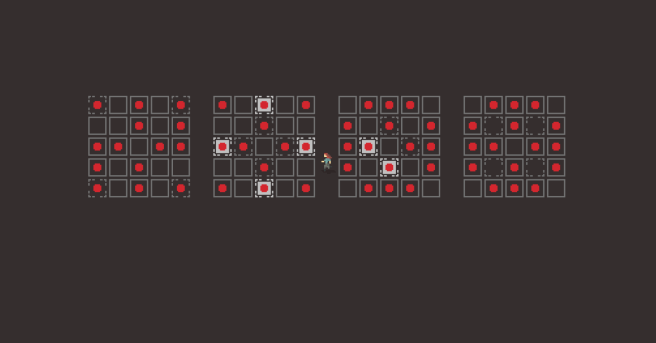
interestingdotpuzzle
An interesting puzzle that we came up with on stream. Special thanks to Tim Nicholson for help on it.

Most of the work that I did on-stream was on designing some more puzzles for the dot mechanic. I now have around 30 decent puzzles for a rough draft version of the area, which is more than half the number of puzzles as there are in the largest single area currently in the game. I still think I can get at least a few more good puzzles out of the mechanic, but I am quite happy even if I don’t come up with much more than the current puzzles anyway.

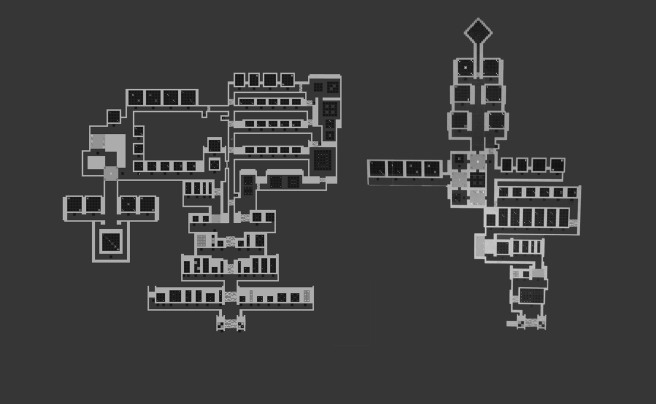
Below is a picture of all the currently existing dot puzzles. I haven’t built an area for them, so they are just floating in empty space in the editor. The circled area is the puzzles I have selected to be part of the rough draft version of the area. I simply showing them as black rectangles, because showing the actual contents would be spoilers. 🙂

taijidotpuzzles.png

Elusive Ideas

I came up with an idea for a new puzzle type in the middle of the night Saturday. (Strangely, I seem to get some of my most creative ideas around the witching hour) This idea was surprising in its simplicity, particularly because I never thought of it in the year and a half that I’ve been working on Taiji. I haven’t quite settled on how to implement it yet, so it remains in the amorphous “idea space” but it hopefully will be interesting when I do/can implement it.

Hope to get more done this week.

21. Dots, Recursion, Optimization, and More?

This week, I spent some more time designing puzzles for the “dot” mechanic that I mentioned in the previous blog post. I currently have about 60 puzzles sitting around in the world using this mechanic. Definitely take that number with a grain of salt as these are rough draft quality puzzles, and I will probably cut a bunch of them.

02-20-17_23-08-19-819
“The dot mechanic”: these are some intermediate puzzles.

Still, it’s been fun designing these puzzles and seeing how much I can wring out of just the baseline, without even including the other mechanics of the game. There is a lot of depth and subtlety, and I really think I probably have just scratched the surface what’s there.

In addition to building out this area, I created a functional prototype of an area that I’d been thinking about before I even started building the game (at least as far back as June 23, 2015, which is the modified date on an old Google Doc where I wrote the idea down). I wasn’t really sure how this area would work at all because the concept was a bit strange, but it actually seems to work well and I am happy with how that is going. Unfortunately, to tell you what the concept behind the area is would be spoilers, so I will just leave you with a mysterious screenshot.

02-20-17_23-14-24-1424.png
What could it mean?

Brute Force Puzzle-Solving, Optimization

So, another thing that I was thinking about for a while, and in particular with regards to designing the dot puzzles, is that it is sometimes difficult for me when designing puzzles to figure out if they have degenerate solutions. By which I mean, I usually am putting a puzzle in the game because I found that it has an interesting and unique solution, but many times I am unaware that there are alternative solutions which may not be nearly as interesting or require as clever thinking on the part of the player.

To that end, I felt that it would be useful to be able to see all the possible solutions for any given panel. This seemed like it would be fairly easy to implement, as it just means using the computer to go through all the possible states that a given panel could be in and checking to see if the panel is solved in each state and keeping a list of all the solved states. Sadly, it was not as simple as I dreamed.

First, even just the basic task of iterating through all possible states for a panel was difficult to figure out how to accomplish. Ultimately, the solution came via mokesmoe, one of the viewers in my twitch chat. It’s a fairly simple algorithm to implement, but it uses recursion and so is a bit hard to wrap ones brain around. But it works and it covers teh whole possibility space once, and only once.

Still, when it came time to test it out, it very quickly became apparent that it was not going to be practical past a very small panel size. Mathematically, this is pretty easy to figure out, as the number of possible states grows exponentially with the increase in panel size, doubling for each new tile that is added. Even a 5×5 panel was enough to lock up Unity completely to the point that after a few minutes, Unity’s built-in crash reporter killed the process and offered for me to report a bug to their developers.

I shouldn’t have been too surprised though. Even though a 5×5 panel seems small, there are 33,554,432 (2^(5*5)) possible configurations that it can be in. If you do anything 33.5 million times then it’s gonna take some time. For example, if each solution validation only took half a millisecond, covering everything would take 4 and a half hours of processing time. (Someone else can double-check my math on that)

So, I set out about trying to optimize the code, both in the coverage code, and in the solution validation code. Sadly, it was a bit difficult to profile what was happening because the Unity profiler and recursion don’t seem to mix very well. Lots of killing Unity.exe from task manager ensued.

Eventually, by pulling some variables out of inner loops and reducing the amount of dynamic memory allocations, I was able to get solution validation down to where it takes less than .05 milliseconds.

Still, although this makes the brute-force solver much more practical, this doesn’t prevent the possibility that some panels will just go into what is basically an infinite loop. So, as an additional precaution, I just added a timeout which will kill the solution search after a certain number of cycles and just consider it “un-brute-forceable.” This basically is just a cheat so that I don’t have to worry about Unity hanging. (Although I still seem to have a problem with some puzzles hanging anyway, so it’s perhaps possible that I’m not doing a thorough enough check (maybe I should just check recursion depth too?)).

Anyway, it was fun to do some optimization work there, but I think mostly I’m still being bitten by both the limits of current technology (we don’t have quantum desktop computers yet), and the limits of high level languages (I don’t really think it should be as slow as 0.05 ms per solution validation on a 5×5 grid, even with the fancy recursive solution validator I have for some of the mechanics)


20. New Mechanics Ahoy!

This week, I’ve finally finished up the replacement interface enough to get back into designing puzzles. At first, I returned to a mechanic that I was in the middle of prototyping when I took a break from working on the game, but after some thinking, I realized there are some issues with it that I don’t know how to resolve yet.

As I mentioned in an earlier blog post about the mechanic, it’s a good mechanic as far as orthogonality goes, but the issue is that it just doesn’t stand on its own very well. It only really gets interesting when it’s combined with the other mechanics. This might be fine if it was a purely augmentative mechanic, but it isn’t.

Additionally, it’s a big goal for the design of this game to have the player solve puzzles without requiring verbal hints, and unfortunately this mechanic is non-trivial to teach the player this way. Essentially, it’s a difficult concept to grasp that doesn’t actually go very deep once you do grasp it. So, it doesn’t feel very rewarding. Until I come up with some changes to the way it works that make it deeper, or at least much easier to teach, I have decided to shelve it in favor of trying something else.

(By the way, As I mentioned in the previous post, I’ve been live-streaming some design/programming work on the game on twitch, so you can see some of this new mechanic being prototyped in the archives here.)

That New Mechanic

So as for the new mechanic, I’m not going to go in-depth about how it works, as I want to maintain a bit of mystery about the game. A big part of the game is the sense of discovery, coming upon some inscrutable thing and poking and prodding at it in order to figure out what’s going on.

But, the important thing to note is that so far this mechanic is working out much better than the last one. It creates interesting and subtle puzzles which are just as good as the others in the game. I am still in the process of seeing how deep it goes and how well it interacts with the other mechanics in the game, but in the meantime I will let you look at some of these new puzzles in an unsolved form and speculate on their meaning.

dotpuzzles
Let’s just call it “the dot mechanic”

The only thing that I will say about the mechanic is that it primarily came to mind when I stopped being so worried about whether or not I was cribbing ideas from The Witness. In my mind, it’s pretty similar to one of the mechanics in that game, but due to the fact that the interaction method of the puzzles in my game is quite different, the way in which it manifests is actually pretty unique.

Day Job and Productivity

So, the other big thing that’s happened this week is that I’ve gone back to my day job. This poses a bit of a problem as it’s usually quite difficult for me to maintain a good work momentum when I’m also working 8 hours a day. Thankfully (or perhaps not, if you ask my wallet), I haven’t been working a lot of hours this week, so I’ve still been pretty productive.

I just hope that I can keep up some level of momentum on the game as my hours pick up at the job. Part of my issue is that when I put the game down for a day or two, I start to over-analyze everything and worry too much about whether or not I’m taking the right steps.

By now I should have realized that it’s more important to just keep moving than it is to be certain that I’m not making a mistake. I can always course-correct later, and I even if I think about it all day before making a decision, I only have so much information. Scrapping and redoing thing is just part of the process, even if it is still pretty uncomfortable for me.

19. Finalizing Up the New Interface

First, I’d like to notify anyone who is following the blog that I have recently been streaming development of the game over on twitch, so follow the channel there and ask to be notified when it goes live. If you missed the stream, you can find a complete archive of all the development streams on my YouTube channel.

So, at the time of the last entry, I was struck with the problem of resolving the ambiguity between the point-and-click type panels and the walk-around type panels, in that they looked pretty much the same. I was also considering abandoning the point-and-click interface as a solution.

This week, I did some more iteration on the artwork for the snake panels, and I’ve reached something that I’m pretty happy with, overall.

Primarily, It is clearly distinguishable from the point-and-click panels. But it also solves a lot of the other small issues that the panels had: The start tiles are clearly elevated compared to the other tiles, and for panels where the player can start on any tile, the startable tiles subtly depress and show a small highlight, encouraging the player to press a button to activate the panel.

newsnakepuzzledesign.gif

I did some other cool interface readability work, but I won’t post it here because spoilers!

The Nitty Gritty Stuff

Mostly though, this week has been technical work.

I did some general performance optimizations when it comes to the panels. They weren’t running terribly, but it seemed like a good time to clean up a lot of the code because I am close to finished with the new interface and know what I need to keep around. Also, there were just some dead wrong things I was doing with regards to solution validation on panels that were eating up CPU cycles. One of them was a bit of a “how did this ever work?” type issue.

Another nice to have feature, which really doesn’t impact the player’s experience much, is Unity’ live script reloading feature. I had broken it at some point for the puzzle panels, and I took the time to investigate why and fix the problem. It was relatively simple, with the only real issue being that I was storing some gameObject references using multi-dimensional arrays, and (amazingly) Unity does not serialize multi-dim arrays.. In order to fix that, I just replaced the multi-dimensional arrays with single dimensional ones and just use [x+width*y] every time I want to access them. I’m still not super happy with this solution, but it at least got the script reloading working.

There was a minor additional snag when trying to get the script reloading working. Which is that even though it was actually working, I couldn’t tell because part of my code didn’t think the panels were visible on-screen and was disabling them (premature optimization bites me again!) The issue here was again just serialization, although most of the panel was getting serialized properly, the bounding box structures that I use to determine visibility were still getting destroyed on script reloads, so all the panels would fail the visiblity check on script reload. Oops!

The rest of the work that I did this week was just about ensuring that all of the existing puzzles are still solvable using the new interface paradigm. There are currently 138 puzzles in the game, which may not seem like a lot, but it’s enough that it can be a bit hard to remember what features all of them do or didn’t use.

As of now, there are only two more small things on the list to implement and the game will be fully playable again, which is great.

Only major bummer is that I have a cold, and I have to go back to my day job in three days.

18. Interface Work and Concept Art

This week, I have been pretty happy with my productivity on the game. I actually did a couple of development streams for the first time in like 6 months at least.

So, what exactly have I been up to this week?

Concept Art

One of the items on the tasklist for the game ever since I started thinking about doing the art myself was to try to do a full concept piece, in order to get some kind of idea of what an area in the game might look like in the style I’ve been working in. After all, doodles are nice but they don’t really look like a game.

So, the piece that I decided to do is intended to be a take on the starting are of the game, which is a floating island.

taijistartconcept2x

Obviously this is super WIP, and I wouldn’t necessarily expect the final version of this area to look anything like this, or the final art to resemble this beyond the broad strokes. But overall, I’m pretty happy with the way it came out.

Interface Redesigning

The main subject of my streams where I was working on the game was the issue that stymied me so badly for the past six months, which is the issue of how the player is going to interact with the panels in the game.

Since I didn’t have a particularly great idea of how to proceed, I just went ahead with what seemed like a good idea and implemented a point-and-click interface. This means that the player can walk around, but also use the mouse to click panels and toggle them off and on.

taiji_clickandtoggle

The interaction of just clicking and toggling the tiles feels pretty good, but it unfortunately ends up creating a bit of a separate issue. Explaining exactly what the issue is will take a bit of doing, but I’ll try.

As I explained in one of the early posts on this blog, the toggling type panels are not the only type of puzzle in the game. There are also another kind of puzzle in which the player is constrained to draw a line by illuminating tiles one at a time next to each other. In the game, this manifests as the player walking across the panel.

taiji_clicksnakepuzzles

The issue comes that I’m not sure what sort of symbology to use with these “snake” puzzles, because when the player is clicking on these squares with the mouse in order to toggle some panels, when they see another identical square, they want to click it. I could perhaps solve this issue by having all the tiles on the snake panels be the “broken square” type that you see pictured here. This is nice because they appear to still be tiles, but they don’t feed into the square symbology so much that the player will assume they can click them.

However, this is still not a full solution to the problem, because I am already using that symbol to represent tiles that the player cannot start from when they are walking around on the panel. In fact, I came up with this idea in the first post on this devlog.

So, I’m not really sure what I can do for these panels that won’t really conflict and will not really seem ugly or in-obvious. I did some tests on the stream of a few possibilities, but none of them really made me happy. I have even considered simply raising the starting tile, but that runs into other issues, in that I then have to ask the player to press a button when they step on each raised tile, or else they cannot start at a tile in the middle of a panel if all of the tiles on the panel are startable.

A Solution?

So, the solution that I’m currently entertaining as of the time of writing this post, is to simply abandon the point-and-click interface, and have the player always walking on all of the panels in the game. This is naturally a consistent interface, but is a choice that I had been avoiding, primarily for aesthetic reasons, because it implies the constraint of always having the panels in the game be on the floor.

However, I may be able to accept that constraint. Either way, I’m not sure what the “right” answer is, I am just trying to do something that has the lightest contrivance.

(There is still another issue with this particular approach that has to do with some of the types of puzzles in the game, but I believe that I have a tenable solution for those as well. I can’t really go into the nature of those puzzles though because it would be spoilers. Perhaps you will be able to catch it on one of my streams, though.)


17. Woah, Dave, working on Sounds

I actually cracked open Unity and worked on the game project yesterday. My thinking was that I had some people who were interested in the game remark about wanting to test it, and I don’t really have a properly playable build of the game at the moment.

So, I opened it up and proceeded to work a bit more on the interface transition, although I am still not entirely sure what the final approach should be. I also found a few bugs and quirks along the way.

One bug was due to the way in which I was determining what tile the player was standing on. This was due to a decision, which seemed innocuous at the time, to test a rectangle instead of a single point. This normally causes no problems, but there are certain degenerate cases when the player walks across a field of tiles that the tile which is currently highlighted will sort of ping-pong back and forth between the tile below and also above the player. I am again, not entirely sure why this is the case, but switching the test to a point test seems to have resolved the issue, and feels much better from an interaction standpoint.

The other thing that I tried out, was adding some more feedback to the puzzles in the game in the form of audio. Thus far, playing the game has been entirely silent, and I started to wonder if some of the complaints about the feel of interacting with the panels in the game had to do with the fact that there was no audio feedback to what the player was doing. I unfortunately do not have a properly functioning version of the cursor interface to see if the audio feedback would be sufficient there. I sort of broke it when  I implemented the direct interface. I was hoping to keep them side-by-side, but that was somewhat more challenging than it initially appeared it was going to be. I may still decide to re-implement a cursor just to see if it is better, but I’m not sure. Main priority is just to get the gameplay up and running again.

16. More Art Style Testing (COLORS!)

In the last post, I mentioned a bit about getting back to looking at doing color in the game, because believe it or not, I’m not making an entirely black and white game. I very much want to do an art style which is mostly monochrome but has splashes of bright colors that pop against the rest of the image.

Here’s my first test of that:

spritingtest4_2

It’s again not a proper mock-up, but is more of a doodle, but I am very happy with where things are going and will try to perhaps do a proper mock-up/concept in the next week.

I’ve gone back and forth about whether I should talk about spoilery things on this blog or not. In general I feel like it’s okay because I haven’t really planned on making the blog public, but as time goes on, I keep thinking maybe I should make this public anyway. I just worry about talking so openly about big reveals in the game that I would like to keep under wraps. Or especially as may be the case here, big reveals that haven’t fully formed yet and so talking about the “ideas” is somewhat irrelevant.

I think for now I’ll just talk about what I’m thinking anyway and worry about it down the road, and perhaps it will make this blog stay more of a pure thing anyway by doing that, because I’ll have reason to not publish anything for spoilers.

(SO, SPOILERS, also some spoilers for The Witness here)

So, what I keep thinking about and what’s stumped me for like 6 months is the interface issue, as well as my desire to have some sort of equivalent of The Witness’s layer 2. This is mainly because I feel like my game takes obvious inspiration in terms of the panel puzzles from that game, but I don’t have any equivalent of the environmental puzzles, nor did I ever even really conceive of a thing. Since, in the case of The Witness’s design, the environmental type hidden object thing came before the rest of the idea, I am kinda at a disadvantage and maybe working backwards.

It’s certainly possible that I should throw in the towel here and just not have any thing of the sort in my own game, but I feel like that would probably be a disappointment to anyone who came to my game based on its similarity to the Witness and were hoping for a similar type of experience.

However, this is a real tall order, because I can’t simply do the same thing that The Witness did. For example, one could imagine a first-person version of Taiji where nothing in the world is square, with organic architecture with lots of flowing curves, and hidden squares in the environment which the player needs to line up their perspective to see. It would perhaps be a cool thing in a way, but it would nonetheless be entirely derivative, and for me, not that satisfying to design.

Essentially it would be the same game, only with a different symbology. The circle would be traded out for the square:

circlesquare
The circle is the one on the right.

So, I would rather take a cue from The Witness on a higher level than that, and instead think about how I can have a similar level of secret. How I can have a game that builds towards a startling revelation but does not have the same revelation, so that it would be just as satisfying to a player who had already played The Witness and might go in with a certain mindset and expecting a certain thing.

This more or less means that I have to work backwards, but I am hopeful that I will come up with something that is at least interesting and different, even if it doesn’t end up being profound.

So, the real spoilery thing, if I actually succeed is what exactly my thinking is on that secret.

I’ve thought a lot about what it should be, and my current best guess, as well as the only idea that I’ve taken far enough to visually prototype is this idea of selective color.

Over a year ago, when I first started the project in its conceptual phase with Martin Cohen, I was thinking about a Zelda-type game with a color theme, but I was not exactly sure how that would manifest. I kind of had an idea that you might be able to add or remove objects which were a certain color. Now, I am coming back to that idea, but I am planning on taking a somewhat different approach to executing on it, which is mostly in having the primarily black and white world, so that color objects will stand out.

My hope is that if I give the player explicit ability to interact with colored puzzle panels, they will perhaps not put together the link that they can also interact with objects of the same color in order to solve puzzles. We will have to see how that turns out in practice, but essentially the idea is just that color will be used as a marker for something in the environment that can be interacted with and perhaps this can be done in a subtle and revelatory way.

The other thing is thinking about generosity in terms of game design, because I have a primary worry about this “layer 2” nonsense since forever ago. Namely that it will feel too restrictive and therefore won’t be very satisfying. It will feel more like, oh I just need to find the red things and then click on them. So, that’s the main thing that I haven’t really figured out yet, but part of me has wondered if I shouldn’t just opt for a game design where the entire world is toggle-able on and off. I’m just not even sure how a game holds up when you can do that type of thing. I certainly don’t want to go halfway and then put limits on what you can and can’t toggle in a way that feels arbitrary. So instead, I must simply come up with rules about what is interactable that feels good but also feels surprising.

sokoban
An example of an explicitly tile-based game, perhaps you could toggle tiles on and off?

I suppose that’s all a bit rambly, but my main thinking is that the color limitation will make it not feel arbitrary what is interact-able or not. The only concern then becomes whether or not it makes it feel too restrictive or unsurprising. I may need to think about it for a while longer before coming to the proper conclusions about how exactly to implement the idea.

7. Good Enough for Now

I’m drafting this part of the post a bit early, both because I just happened to have some free time to write it, and because I think I have a good idea on how to proceed with the new interface solution.

Basically, if you remember my post where I postulated on four possible options, the current plan is essentially option #4, although I am thinking that instead of a fairy type familiar the cursor that you’re moving around will just be the shadow of the player character. You will be able to switch between the player themselves and the shadow. The shadow can basically move onto any surface freely, but they cannot leave the current screen.

This works well I think because you never really feel like you’re switching modes too much, even though you kind of are switching between the two avatars. It is also a highly limited thing, unlike my thinking about the gravity switching walking on walls type option, which becomes a game mechanic in its own right. I don’t generally want to add things to the game that feel like grafted on monstrous solutions. I want the game to feel very elegant and light on mechanics that the player needs to think about in regard to puzzles.

This is not to say that I am completely disregarding the interesting aspects of that wall-walking solutions, but just to say that I feel as though I have settled  upon the “good enough for now” solution to this problem.

The shadow aspect also has some interesting thematic aspects in that normally you are dealing with switching between light/dark things, and the shadow is like a dark version of yourself. I also had this idea that perhaps the shadow could provide some peculiar insights into the nature of the world of the game. I won’t spoil that here, but it could be an interesting avenue to pursue.

So, I just worked on the game for a little bit today which felt really good to get back to. I was working on the new interface solution, and as I pretty much expected, it feels way better than the old way. I still haven’t gotten around to doing the “shadow” mode input method, but I implemented the basics, which is just the ability of the player to toggle tiles directly, and the new snake panel input method (although the tiles don’t raise up yet, and just light up.)

Anyway, short blog post, but I’ll post a gif!

test

4. Rebuilding “The Dice Face Area”

Although I had put together a prioritized to-do list, with implementing the new control method at the top. I decided to do something else this week and redesign the “dice face” puzzle area. (I also need to start coming up with some themes and ideas for these areas so I have better names for them)

Although maybe not the biggest priority on the list, it was an important thing to do. Even though the dice face area was not the weakest part of the game, it was definitely the most bloated.

When I’m building out a new area or set of puzzles, usually I just start by adding as many puzzles as I possibly can. This is good because it ensures that I have a good pool of puzzles to draw from and have hopefully made some strides towards exploring the possibility space of the mechanics. It’s not possible to be 100% sure that I haven’t missed some good ones, but overall I end up with more than enough puzzles to work with.

Then the second phase is to aggressively cut puzzles and rebuild the area more-or-less from scratch. So that’s what I did this past week for the dice face area. It shrunk significantly, from 89 puzzles down to 45 puzzles. Slightly more than half the puzzles. You can see the difference between the two versions in the following picture: (newer is on the right)

dicefacesizecomparisonAlthough the new area is much smaller, the progression is way more aggressive, and so it should take as much time (if not more) for the average player to get through. And the average individual puzzle quality in the area should be much higher as well.

So, I would say that overall there have been a myriad of improvements made to the area on this second revision (for one thing, it’s way easier to navigate, while still maintaining a bit of freedom at a certain point), and there are some puzzles which I added which I am super happy with. I’m not 100% done with the area, and some of the puzzles could get moved around or cut even. But, it’s a definite improvement.

Also, I threw together some ideas of a logo. Probably not nearly as good as whatever Martin could do. One on the left is my own custom font, the right is a font by Eeve Somepx called Moji. I almost never really care about logos, but maybe worth thinking about.

taijilogo


3. Damn the Interface, Full Speed Ahead!

This week I didn’t really get a chance to work on the game very much. Was busy with some other things (podcasts, getting stuff done for Patreon backers), and I had a major depressive episode. However, I did work on the game a bit today and streamed some designing of a new mechanic. We’ll get to that in a bit, but first I wanted to talk about some of the things I’ve been thinking about through the week whilst not “actually working.”

Interface Options

The interface problem continues to haunt me, so I’ve been thinking about that a lot and I’ve really narrowed it down to three main options:

Option 1

Keep the current interface and just press onwards with all of its problems. I don’t really like this option for obvious reasons. The current interface is super modal and it just feels kinda bad to interact with a discrete tile-based movement system in 2016 (or whenever the game is done). However, all of the game’s design has been done so far using this interaction method, so it naturally requires the least amount of redesigning work to proceed with.

Option 2

Replace everything in the interface with a “player as cursor” type model, where you’re always walking around on the panels to solve them. The primary issue with this method is that it is a bit incongruous with the way some of the puzzles already work (some of which I rather like), and reconciling this problem either requires some kind of ghost player to walk around on panels that the player cannot access and/or requires introducing the ability for the player to walk up on walls. Or both. So, although this is a promising approach, it entails introduction of some new mechanics that I am not sure that I can really capitalize on in any other major ways besides just using it as an interaction method for panels. The walking on walls thing is certainly cool, and plays off the ambiguity of a top-down perspective in a very Escherian way, but again: I’m not really sure I know how to capitalize on that in a good way. I feel like I’m likely to fall into the pit of bad level design that early-era FEZ did. On the other hand, it is an interesting and somewhat potentially mind-bending mechanic, if I can solve those problems.

Option 3

Giving the player a pointer type cursor which can be used at any time. This is a somewhat nice solution because it can probably be done without any sort of modality, just mapping the cursor to the mouse or to the right stick. However, it again is pretty weird in that it feels like you’re controlling two things and you need to mentally switch modes. But it doesn’t have the problems that the always walking on panels method has, in that you don’t always have to be walking on panels, and you don’t have a player shaped cursor that doesn’t really act like the cursor. The cursor looks like a cursor and the player looks like a player. It also has some interesting gameplay implications in that the cursor can be used on any panel that the player can see, even if they cannot get to it. It does however beg the question of the layer 2 type puzzles, as the player will probably expect to be able to interact with tile looking things in the environment. (Admittedly a problem with the other methods as well, but perhaps to a lesser extent?)

So, I’m not sure which of these approaches I really want to choose right now, as I haven’t totally fallen into that sweet spot where everything just clicks and it’s obvious which is the most elegant way to proceed. It may just be that I have to adopt some sort of hybrid approach. In fact, let’s call it:

Option 4

Take the pointer type cursor aspect of Option 3 (We can maybe implement it as a fairy?), and combine it with the walking around aspect of Option 2, so that the player can solve panels that they are walking around on just by walking around and pressing the buttons, without using the cursor. But they do have the option to move the cursor around and activate a panel which they cannot reach. Perhaps the fairy is the thing that bonks its head on the panels to make them do things? Fairies are kinda magical, so maybe this also ties into the storyline aspect of the protagonist having some sort of magical ability to interact with the panels. Also the “oh you have a fairy” sort of calls back to Zelda 64, which is maybe cool. STEAL IT!

Orthogowhatnow?

So, I decided to put together a bit of a prioritized todo list (well, actually I already had one, but I finally took a look at it and struck some of the completed tasks off the list and added more new ones). Although I think that the interface problem is really the most pressing thing, since it affects so many other decisions, I decided to forgo doing any actual work on that and instead implement a new mechanic idea that I had a couple days ago when I was driving into work.

Jonathan Blow and Marc Ten Bosch gave a talk together at IndieCade several years ago called Designing to Reveal the Nature of the Universe (excellent talk, I recommend checking it out), in which they set out a list of aesthetics for game design. I won’t recount the whole list here, but the one that I was thinking about that led me to think of a new mechanic was “Orthogonality.”

If you don’t know what orthogonality even means (which why should you, it’s a long word and ugh math), it technically refers to the general property of two lines forming a right angle, across 2 or more dimensions. However, for the purposes of this discussion, it basically means design concepts which do not overlap with eachother.

A Tale of Two Mechanics

Some mechanical spoilers below.

So, I was trying to think about some other types of symbols to put on panels that might introduce constraints and create more puzzles and interact well with the existing symbols (just the dice faces at the moment). Earlier, I had thought about odd and even, but the issue there I realized is that there is significant overlap with the dice face puzzles. They are both about the total area of a shape. As an example, if you were to have a panel which had 4 symbols on it, each on different tiles: a 4 dice face, a 3 dice face, an odd symbol, and an even symbol. The solution would probably be: oh I need to put the odd symbol with the odd dice face and the even symbol with the even dice face. This observation about the single solution quickly turns into a generality about the puzzles.

This might seem fine, but to further illustrate my point of why this is a bad choice of mechanic, I will posit the following question:

“Are there many situations in which this new mechanic (the odd and even tile constraints) could equivalently be expressed using an existing mechanic (the dice face constraints)?”

I would posit that the answer in this case is yes, which generally means “don’t do it.” I could go into a lot of specific examples of how they are equivalent mechanics, but I will just give one and move on.

If we were to take the following panel, wherein we say that the 0 is required to be part of a lowlit area which is odd and the 1 is required to be part of a lowlit area that is even:

image

The possible solutions would be as follows:
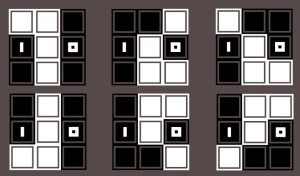
image

Although we cannot entirely duplicate the same panel with the same set of solutions, we can cover the bases and achieve very similar results across 3 different dice face panels:

image

Whose complete solutions are as follows (note that in addition to covering the solutions of the odd/even one, the leftmost panel has two additional solutions due to the way in which dice faces combine with eachother):

image

“But Matthew!” you say, “look at how many solutions there were for that one odd/even panel, and you’re trying to say that a mechanic which cannot duplicate that solutions space without three separate panels is BETTER?”

To which I would say, “yes.” And the reason being is that sometimes having a tighter solution space is actually a much better thing. And even if you were to disagree with me on that (a fair choice), the argument is really about whether or not to add the odd/even mechanic in addition to the dice faces.

Clearly, I would say, the answer is no.

The New Mechanic

So, while looking for orthogonal concepts, I happened across the idea of having a tile care about the state of its immediate neighbors. This is nice because it has nothing to do with area, and only has to do with the fact that the tiles are on a grid and each tile has up to four neighbors.

So my initial implementation of the mechanic was for each tile to care about how many neighbors it has that are lit up. This is perhaps fine, but it seemed to have two problems.

First, that it was too prescriptive. I tend to avoid puzzles and mechanics that basically feel like I’ve envisioned an exact solution and merely laid down some tiles to enforce that you draw that line or whatever. This has a lot to do with my desire for bottom-up puzzles and things that I have discovered rather than just pulled out of my ass.

Second, I felt like the “is it lit up or not” aspect was an additional point of overlap with the dice faces, which already care about being lit up. It may come to a point where I want to separate out that aspect of the dice faces themselves, but at this point, I’m letting them care about what’s lit up or not, so it seemed like the new mechanic shouldn’t care.

So, what I decided to change the mechanic to is instead an equality check, simply enough each tile cares about how many neighbors it has that are the same as itself. This has the nice property of opening up the solution space a bit more (even though sometimes it’s better to have a narrower solution space, I tend to feel like it is a sweet spot in the middle that I’m aiming for), as well as making the concept fully orthogonal to the dice faces.

Here’s an example of one of the puzzles that we discovered on stream which I particularly like. (I’ll leave the solution as an exercise for the reader. Keep in mind, yellow means “the same as me” and blue
means “not the same”.):

image