11. Crossing the Line into Lazy-town

Still haven’t touched the game. Keep procrastinating. To be honest I have a hard time not calling it laziness at this point, but I am trying to not be so hard on myself. There are two parts of me, the part that wants to get shit done, and the part that wants to procrastinate. Generally, the “get shit done” part making the “lets watch stargate” part feel guilty only makes him want to work less.

On the positive side. I am no longer sick, and I have been having some good and exciting (although a bit stressful) things happening in my life lately.

10. Still Sicking After All These Years

Nothing really much to report other than it turned out my hopes of getting better were a bit premature. I never did go to a doctor, as I am poor, but I believe it was strep and as of writing this I am maybe 90% better. So hopefully this upcoming week will have more productivity and less laying around letting my body drain out fluids and trying not to die.

9. Sick Days

Unfortunately this week I have been down with a terrible flu that left me mostly delirious and unable to work. I’m starting to recover a bit now though so that’s good.

Also somewhat irritated by the lack of version parity between the Windows and Linux version of Unity, as well as Unity’s seeming indifference to this. Right now, you can get the latest beta version of Unity on both Linux and Windows, but not the latest stable? What? This leaves me unable to work on the game on my laptop because the project will not load.

Sometimes streaming the game does actually help with my productivity because it’s a scheduled thing that I have to show up for. I’m trying to work on feeling accountable to my own self for showing up to work on the game on time, but it’s not always easy to do that.

8. Optimizing Panels

This week I did some nice polishing work on the panels in order to make them look nicer. I also switched the game from an orthographic camera to oblique rendering. If you have no idea what that is, essentially it means that the game is in 3 dimensions, with the third dimension simply being represented as an offset on the first two. It’s the method that most 2D top-down games use to render their art, although usually it’s not actually computationally represented as 3D objects.

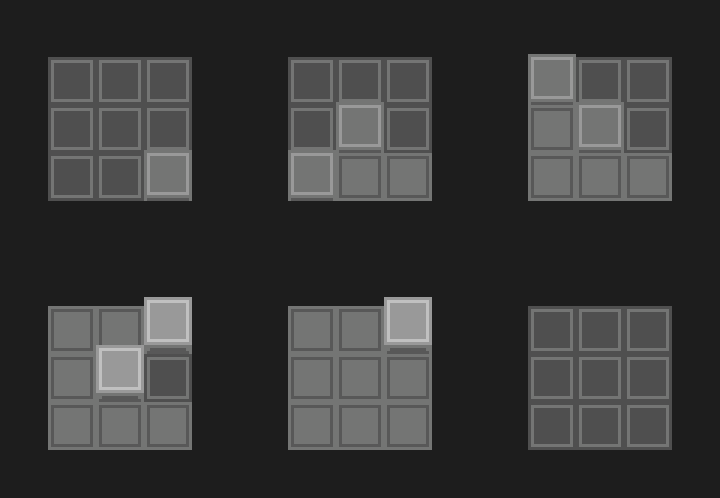
The nice thing about moving to oblique rendering is that you can put 3D objects in the scene and they “just work.” I really only switched because for the snake panels I wanted to do an effect which looked like this, where the individual tiles popped up and down:

snake_puzzle_protoanimbig

There is a problem with doing this in a completely 2D method, because then you need to worry about sorting of the individual tiles. Although this is not a particularly complicated problem, it just seemed easier for me to switch to an oblique rendering mode and make each tile literally pop up on the Z axis.

I may regress on this decision at some point, but really there’s no downside to rendering with this method, as if you keep everything on the same z plane, it’s exactly the same as 2D. The main issue that kept me from going to this method earlier was a weird sorting bug, which I eventually tracked down to the fact that my multi-pass rendering method (which I use to get smooth sub-pixel motion that preserves the sharpness of pixel art) was set up to use a render texture without a depth-buffer.

But as for the actual 3d objects part of it for this particular effect, I may change my mind, as I want to have tiles both on the floor and on walls, and due to the way the projection works, the tiles on the wall would need to be rotated along the Z axis to properly be drawn, which would require changing the way the panels work somewhat. Either way, it shouldn’t be too much work to switch it over.

Here’s a (poorly compressed) clip of the results. I think it’s pretty close to the above mock-up:


Optimization

The only downside to doing this polish work is that I ended up adding a lot of fancy interpolation and additional detail objects to the tiles on the panels, which resulted in some performance issues. The game got down to running around 20fps on my (reasonably good) desktop PC.

So, I decided to take some time to do an optimization pass on the game. Which was pretty fun. I relied quite heavily on Unity’s built-in profiler tools, which can be very helpful sometimes and not really helpful at all other times. In particular, I’m still having a NullReference issue on script reloads which I am not really sure what to do about yet. I’ll have to build a small test scene to really track that one down.

I won’t go too much into the details of the optimization, but I did want to point out a couple of fun things which I learned.

Color == Color is quite slow in Unity because under the hood it is doing a approximate equality test. So I gained a 10x speedup just by switching to a component-wise test on color equality. I know, I know, you’re not supposed to directly compare floating point values, but in this case I believe it was acceptable as I’m only trying to see if I already set a value or if just changed this frame. You might ask why I didn’t just use a has_changed flag and a setter function. And the answer is somewhat complicated, and mostly has to do with having a lot of state that is not being properly tracked in one place at the moment. Which means I probably need to redo a lot of the panel code to consolidate the state tracking and so something a bit more of a FSM per each tile than what I’m doing.

The other interesting thing was, there was a serious overhead just from the number of active GameObjects I had in the world. (Over 10,000) For active GameObjects, at least those with an attached script, Unity has to call the Update() function on each of them, even if it immediately returns. The optimization here was pretty simple, just disabling panels when they are not on the screen.

Another little bit there that was kinda wierd, I was using Unity’s built-in Bounds object to store the boundaries of both the screen and the panels. Unfortunately, again, accessing Bounds.min and Bounds.max was secretly under the hood doing some computations to figure out those values, as they are not actually stored. And since I was checking each panel each frame to see if it had become visible simply by comparing the bounds, and there are over 200 panels in the game, that was contributing a few milliseconds just by itself. A fairly simple fix again, just cache those values and compare the cached versions rather than using the Bounds object directly.

Perhaps the lesson I’ve learned here is to avoid using the built-in Unity types as much as I can, as they all seem to do unexpected and somewhat computationally expensive things under the hood when you are just attempting to access a value or compare equality. Also, the dangers of overrides.

Anyhoo, a bit of a technical week, as I continue implementation of the new interface system, but hopefully it’s been fun to read about some of those details for some of you. 🙂


7. Good Enough for Now

I’m drafting this part of the post a bit early, both because I just happened to have some free time to write it, and because I think I have a good idea on how to proceed with the new interface solution.

Basically, if you remember my post where I postulated on four possible options, the current plan is essentially option #4, although I am thinking that instead of a fairy type familiar the cursor that you’re moving around will just be the shadow of the player character. You will be able to switch between the player themselves and the shadow. The shadow can basically move onto any surface freely, but they cannot leave the current screen.

This works well I think because you never really feel like you’re switching modes too much, even though you kind of are switching between the two avatars. It is also a highly limited thing, unlike my thinking about the gravity switching walking on walls type option, which becomes a game mechanic in its own right. I don’t generally want to add things to the game that feel like grafted on monstrous solutions. I want the game to feel very elegant and light on mechanics that the player needs to think about in regard to puzzles.

This is not to say that I am completely disregarding the interesting aspects of that wall-walking solutions, but just to say that I feel as though I have settled  upon the “good enough for now” solution to this problem.

The shadow aspect also has some interesting thematic aspects in that normally you are dealing with switching between light/dark things, and the shadow is like a dark version of yourself. I also had this idea that perhaps the shadow could provide some peculiar insights into the nature of the world of the game. I won’t spoil that here, but it could be an interesting avenue to pursue.

So, I just worked on the game for a little bit today which felt really good to get back to. I was working on the new interface solution, and as I pretty much expected, it feels way better than the old way. I still haven’t gotten around to doing the “shadow” mode input method, but I implemented the basics, which is just the ability of the player to toggle tiles directly, and the new snake panel input method (although the tiles don’t raise up yet, and just light up.)

Anyway, short blog post, but I’ll post a gif!

test

6. The Trough of Unproductivity

Actually a bit late with this week’s post. Some life things happened and I forgot to write it Friday.

Still, I managed to go another week without opening Unity or working on the game. That’s a bit or a bummer, but because my productivity and my mood are so directly connected, I’m trying not to feel too badly about it. If I beat myself up for not being productive, I’m just taking away energy that could be used for productive things.

So, in some ways this week was disappointing, but my overall mood seems to be improving so we will see how it goes. Plus, I made a commitment to do weekly updates here, even if I am just showing up to say that I didn’t do anything.

I have still been thinking about the interface issues with the game, and struggling to come to a good solution. I know it can’t stay the way it is, as it just doesn’t feel very good. But I’m not sure what exactly to do instead. I feel like it’s quite late to make a major decision like this, but I am also not sure I know yet how to make it properly. I will either end up having to try something even if I’m not much more sure of it than the current interface, or I will have to just shelve this question and proceed anyway.

I try to catch myself when I see that I am being unproductive and in the analysis paralysis type mindset. But this is hard because I really have no good idea on how to proceed.

.

5. Minor Setbacks

This week has been unfortunately somewhat unproductive on the game. I suppose I could call it a mental health break. I have been having a real hard time emotionally and with some difficult interpersonal stuff happening, I just found myself not in the mood to get any work done.

I suppose this would be a good time to being up my thoughts on mental health as it relates to game development. Steve Swink said in a recent devlog update for Scale that “…the actual most important skill is for a game designer is mental state management. Not tuning, balance, or the ability to design clever puzzles. The most important skill is the ability to consistently put yourself into a state where good, productive work gets done.”

I couldn’t agree more. I also feel like many developers underestimate how difficult this is to do. Especially, I think, as an independent developer it’s easy to feel the pressure or lose faith in yourself. You’re literally the one who has to do it. It is not like being on a big team where if you can’t do it, someone else can probably take your place.

This also means that development can slow down drastically if you have a bad week or suffer from mental health issues like I do.

Anyway, I don’t want anyone to be overly concerned about me. I have felt this way before, and I should be able to pull out of it again. Admittedly I have been feeling worse than I have in close to ten years, but I’m still here.

This devlog is probably getting too personal, but I would like to take a second to thank my close friend Amber for being very supportive and understanding of me the past couple weeks. I know I can be a huge emotional drain at times like these. So thanks.

So, anyway. What did get done?

I streamed some puzzle design last weekend, working more on the “edge” based puzzles. The ones that care about whether neighboring tiles are the same or not. Got a couple more interesting puzzles there. I am still not sure how to introduce that mechanic in a clean way, but I suppose the common wisdom is to do tutorials last. I think it’s probably again a mental state thing where I’m just psyching myself out because I just got to a point with the dice face puzzles where there’s a strong introduction of the mechanics that feels really clean. So, jumping back into the early stage on another mechanic, although necessary, feels like a step back in terms of my mental clarity about the subject.

Hope to be in a more productive place next week.

I’ll belay the screenshot for this week, but here’s something interesting I saw in the real world:

image

4. Rebuilding “The Dice Face Area”

Although I had put together a prioritized to-do list, with implementing the new control method at the top. I decided to do something else this week and redesign the “dice face” puzzle area. (I also need to start coming up with some themes and ideas for these areas so I have better names for them)

Although maybe not the biggest priority on the list, it was an important thing to do. Even though the dice face area was not the weakest part of the game, it was definitely the most bloated.

When I’m building out a new area or set of puzzles, usually I just start by adding as many puzzles as I possibly can. This is good because it ensures that I have a good pool of puzzles to draw from and have hopefully made some strides towards exploring the possibility space of the mechanics. It’s not possible to be 100% sure that I haven’t missed some good ones, but overall I end up with more than enough puzzles to work with.

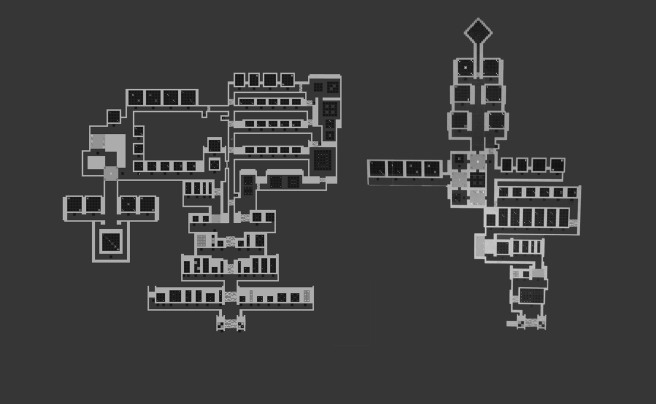
Then the second phase is to aggressively cut puzzles and rebuild the area more-or-less from scratch. So that’s what I did this past week for the dice face area. It shrunk significantly, from 89 puzzles down to 45 puzzles. Slightly more than half the puzzles. You can see the difference between the two versions in the following picture: (newer is on the right)

dicefacesizecomparisonAlthough the new area is much smaller, the progression is way more aggressive, and so it should take as much time (if not more) for the average player to get through. And the average individual puzzle quality in the area should be much higher as well.

So, I would say that overall there have been a myriad of improvements made to the area on this second revision (for one thing, it’s way easier to navigate, while still maintaining a bit of freedom at a certain point), and there are some puzzles which I added which I am super happy with. I’m not 100% done with the area, and some of the puzzles could get moved around or cut even. But, it’s a definite improvement.

Also, I threw together some ideas of a logo. Probably not nearly as good as whatever Martin could do. One on the left is my own custom font, the right is a font by Eeve Somepx called Moji. I almost never really care about logos, but maybe worth thinking about.

taijilogo


3. Damn the Interface, Full Speed Ahead!

This week I didn’t really get a chance to work on the game very much. Was busy with some other things (podcasts, getting stuff done for Patreon backers), and I had a major depressive episode. However, I did work on the game a bit today and streamed some designing of a new mechanic. We’ll get to that in a bit, but first I wanted to talk about some of the things I’ve been thinking about through the week whilst not “actually working.”

Interface Options

The interface problem continues to haunt me, so I’ve been thinking about that a lot and I’ve really narrowed it down to three main options:

Option 1

Keep the current interface and just press onwards with all of its problems. I don’t really like this option for obvious reasons. The current interface is super modal and it just feels kinda bad to interact with a discrete tile-based movement system in 2016 (or whenever the game is done). However, all of the game’s design has been done so far using this interaction method, so it naturally requires the least amount of redesigning work to proceed with.

Option 2

Replace everything in the interface with a “player as cursor” type model, where you’re always walking around on the panels to solve them. The primary issue with this method is that it is a bit incongruous with the way some of the puzzles already work (some of which I rather like), and reconciling this problem either requires some kind of ghost player to walk around on panels that the player cannot access and/or requires introducing the ability for the player to walk up on walls. Or both. So, although this is a promising approach, it entails introduction of some new mechanics that I am not sure that I can really capitalize on in any other major ways besides just using it as an interaction method for panels. The walking on walls thing is certainly cool, and plays off the ambiguity of a top-down perspective in a very Escherian way, but again: I’m not really sure I know how to capitalize on that in a good way. I feel like I’m likely to fall into the pit of bad level design that early-era FEZ did. On the other hand, it is an interesting and somewhat potentially mind-bending mechanic, if I can solve those problems.

Option 3

Giving the player a pointer type cursor which can be used at any time. This is a somewhat nice solution because it can probably be done without any sort of modality, just mapping the cursor to the mouse or to the right stick. However, it again is pretty weird in that it feels like you’re controlling two things and you need to mentally switch modes. But it doesn’t have the problems that the always walking on panels method has, in that you don’t always have to be walking on panels, and you don’t have a player shaped cursor that doesn’t really act like the cursor. The cursor looks like a cursor and the player looks like a player. It also has some interesting gameplay implications in that the cursor can be used on any panel that the player can see, even if they cannot get to it. It does however beg the question of the layer 2 type puzzles, as the player will probably expect to be able to interact with tile looking things in the environment. (Admittedly a problem with the other methods as well, but perhaps to a lesser extent?)

So, I’m not sure which of these approaches I really want to choose right now, as I haven’t totally fallen into that sweet spot where everything just clicks and it’s obvious which is the most elegant way to proceed. It may just be that I have to adopt some sort of hybrid approach. In fact, let’s call it:

Option 4

Take the pointer type cursor aspect of Option 3 (We can maybe implement it as a fairy?), and combine it with the walking around aspect of Option 2, so that the player can solve panels that they are walking around on just by walking around and pressing the buttons, without using the cursor. But they do have the option to move the cursor around and activate a panel which they cannot reach. Perhaps the fairy is the thing that bonks its head on the panels to make them do things? Fairies are kinda magical, so maybe this also ties into the storyline aspect of the protagonist having some sort of magical ability to interact with the panels. Also the “oh you have a fairy” sort of calls back to Zelda 64, which is maybe cool. STEAL IT!

Orthogowhatnow?

So, I decided to put together a bit of a prioritized todo list (well, actually I already had one, but I finally took a look at it and struck some of the completed tasks off the list and added more new ones). Although I think that the interface problem is really the most pressing thing, since it affects so many other decisions, I decided to forgo doing any actual work on that and instead implement a new mechanic idea that I had a couple days ago when I was driving into work.

Jonathan Blow and Marc Ten Bosch gave a talk together at IndieCade several years ago called Designing to Reveal the Nature of the Universe (excellent talk, I recommend checking it out), in which they set out a list of aesthetics for game design. I won’t recount the whole list here, but the one that I was thinking about that led me to think of a new mechanic was “Orthogonality.”

If you don’t know what orthogonality even means (which why should you, it’s a long word and ugh math), it technically refers to the general property of two lines forming a right angle, across 2 or more dimensions. However, for the purposes of this discussion, it basically means design concepts which do not overlap with eachother.

A Tale of Two Mechanics

Some mechanical spoilers below.

So, I was trying to think about some other types of symbols to put on panels that might introduce constraints and create more puzzles and interact well with the existing symbols (just the dice faces at the moment). Earlier, I had thought about odd and even, but the issue there I realized is that there is significant overlap with the dice face puzzles. They are both about the total area of a shape. As an example, if you were to have a panel which had 4 symbols on it, each on different tiles: a 4 dice face, a 3 dice face, an odd symbol, and an even symbol. The solution would probably be: oh I need to put the odd symbol with the odd dice face and the even symbol with the even dice face. This observation about the single solution quickly turns into a generality about the puzzles.

This might seem fine, but to further illustrate my point of why this is a bad choice of mechanic, I will posit the following question:

“Are there many situations in which this new mechanic (the odd and even tile constraints) could equivalently be expressed using an existing mechanic (the dice face constraints)?”

I would posit that the answer in this case is yes, which generally means “don’t do it.” I could go into a lot of specific examples of how they are equivalent mechanics, but I will just give one and move on.

If we were to take the following panel, wherein we say that the 0 is required to be part of a lowlit area which is odd and the 1 is required to be part of a lowlit area that is even:

image

The possible solutions would be as follows:
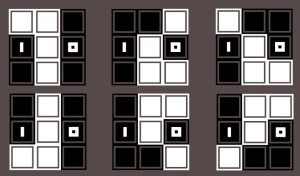
image

Although we cannot entirely duplicate the same panel with the same set of solutions, we can cover the bases and achieve very similar results across 3 different dice face panels:

image

Whose complete solutions are as follows (note that in addition to covering the solutions of the odd/even one, the leftmost panel has two additional solutions due to the way in which dice faces combine with eachother):

image

“But Matthew!” you say, “look at how many solutions there were for that one odd/even panel, and you’re trying to say that a mechanic which cannot duplicate that solutions space without three separate panels is BETTER?”

To which I would say, “yes.” And the reason being is that sometimes having a tighter solution space is actually a much better thing. And even if you were to disagree with me on that (a fair choice), the argument is really about whether or not to add the odd/even mechanic in addition to the dice faces.

Clearly, I would say, the answer is no.

The New Mechanic

So, while looking for orthogonal concepts, I happened across the idea of having a tile care about the state of its immediate neighbors. This is nice because it has nothing to do with area, and only has to do with the fact that the tiles are on a grid and each tile has up to four neighbors.

So my initial implementation of the mechanic was for each tile to care about how many neighbors it has that are lit up. This is perhaps fine, but it seemed to have two problems.

First, that it was too prescriptive. I tend to avoid puzzles and mechanics that basically feel like I’ve envisioned an exact solution and merely laid down some tiles to enforce that you draw that line or whatever. This has a lot to do with my desire for bottom-up puzzles and things that I have discovered rather than just pulled out of my ass.

Second, I felt like the “is it lit up or not” aspect was an additional point of overlap with the dice faces, which already care about being lit up. It may come to a point where I want to separate out that aspect of the dice faces themselves, but at this point, I’m letting them care about what’s lit up or not, so it seemed like the new mechanic shouldn’t care.

So, what I decided to change the mechanic to is instead an equality check, simply enough each tile cares about how many neighbors it has that are the same as itself. This has the nice property of opening up the solution space a bit more (even though sometimes it’s better to have a narrower solution space, I tend to feel like it is a sweet spot in the middle that I’m aiming for), as well as making the concept fully orthogonal to the dice faces.

Here’s an example of one of the puzzles that we discovered on stream which I particularly like. (I’ll leave the solution as an exercise for the reader. Keep in mind, yellow means “the same as me” and blue
means “not the same”.):

image

2. Another Interface Possibility

This morning I had a pretty good idea. Really the best ideas are the ones that solve like 3 problems at once and in hindsight just seem stupidly obvious.

The Problem

I touched on this in the previous post, but I will reiterate below for clarity:

So, I currently have two major categories of puzzle panel in the game. The first, which I call “freeform” or “togglers” is a simple grid which you can move around on and toggle tiles at your leisure. The second type of puzzle in the game which I call “snake” puzzles, after the game of the same name.

dAtcCfH

I just call them that because they have a certain movement type where you must highlight connected squares in order and cannot cross over tiles you have already lit up. You’re sort of drawing a line. Otherwise, they aren’t that similar to Snake, in that you don’t have a fixed length and you aren’t collecting anything along the way.

As I mentioned in last week’s post, I’ve been thinking about changing the overall input method in order to avoid the weird mode switching and the sort of unnatural feel of the cursor. The solution was proposed by Casey Muratori, and is pretty simple: Just always have the player be walking around, even when they are solving panels.

Now, this is really no problem for the toggler panels, as you just move the player around and press a button when you want to switch the tile you are standing on. But for the snake panels, it’s a bit more of a difficult problem. How do I enforce the rules such that the player cannot cross over the line they have already drawn.

My first idea was that perhaps each tile would raise up into a wall behind the player as they stepped off of it. This is good in that it enforces the impassibility of the line by utilizing the collision detection of the player. However, it has the nasty issue of not really lining up with the original mechanic. The problem there is about what happens when the player gets to the last tile of the shape they were wanting to fill in. Since the shape is not really raised/lit up until the player steps off of tile normally, there are really only two options: either the player must step off of the panel entirely, or the tiles have to light up when you step on them but only raise up when you step off of them.

Neither of these solutions really made me feel very happy, because it didn’t have a good unification between raised tiles and highlighted ones. In short: it seemed pretty forced.

As I also mentioned in the last post, I was also having issues with how you would even define where you would start on that type of panel. If we are saying the player can go around and hit a button on the panel, they can really go and do that anywhere. But for gameplay purposes, sometimes I want to constrain where the player can draw the line from.

So, the idea I came up with this morning is represented in the following gif (just a mockup, but the final thing should be somewhat similar):

snake_puzzle_protoanimbig

So, what is it?

Essentially it is the same as the “can’t start here” tiles of the last post, only represented in a way that is similar to the “raised walls” idea from before. So the player starts on the raised area, which acts as a button, depressing and lighting up. At that point, the next available tiles raise up and can then be pressed. If there are multiple tiles to choose from, all of them depress when one button is pressed, but only the one the player was standing on remains lit.

I usually gravitate towards the ideas that feel like the most elegant representation of an idea. And since I first realized I had this problem, I was really struggling to find anything elegant. It just felt like I was trying to shoehorn the old puzzles into a new mechanic. But this I feel like is a really beautiful solution that enforces the rules of the original mechanic and translates it into a new input method while feeling actually better than the original mechanic did.

I still have one problem to solve with the input method change, which is actually an old problem. And that is visually distinguishing between the two main panel types. I can either have the player always press a button when their avatar is standing over the tile they want to depress, and the toggler panel also will just have a bunch of the button tiles that are raised up and behave a bit differently.

Not totally happy with that, but I’m reaching a point in my game design career that I’ve started to just be at peace and know that a good and elegant idea will come along eventually. The game doesn’t have to ship tomorrow.

Until it does, then maybe we just go with what seems the least bad, or try to cut what we can.